
3.2 KiB

WayVR acts as a bridge between Wayland applications and wlx-overlay-s panels, allowing you to display your applications within a VR environment. Internally, WayVR utilizes Smithay to run a Wayland compositor.
>> Quick setup <<
Configure your applications list
Go to src/res/wayvr.yaml to configure your desired application list. This configuration file represents all currently available WayVR options. Feel free to adjust it to your liking.
Add WayVR Launcher to your watch
Copy watch_wayvr_example.yaml to ~/.config/wlxoverlay/watch.yaml. This file contains pre-configured WayVRLauncher and WayVRDisplayList widget types. By default, the default_catalog is used.
That's it; you're all set!
Make sure you have wayvr feature enabled in Cargo.toml (enabled by default)
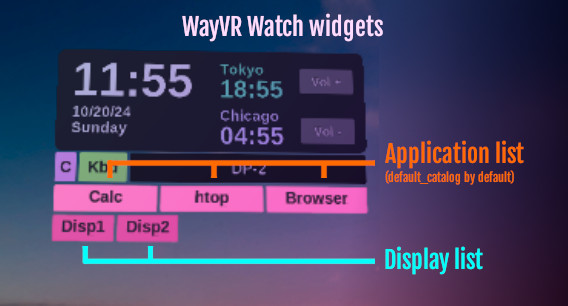
Overview
Features
- Display Wayland applications without GPU overhead (zero-copy via dma-buf)
- Mouse and keyboard input, with precision scrolling support
- Tested on AMD and Nvidia
Supported software
- Basically all Qt and GTK applications (they work out of the box)
- Most XWayland applications via
cage
XWayland
WayVR does not have native XWayland support. You can run X11 applications (or these who require DISPLAY set) by wrapping them in a cage program, like so:
- name: "Xeyes"
  target_display: "Disp1"
  exec: "cage"
  args: "xeyes -- -fg blue"
instead of:
- name: "Xeyes"
  target_display: "Disp1"
  exec: "xeyes"
  args: "-fg blue"
in wayvr.yaml configuration file, in your desired catalog.
Launching external apps inside WayVR
To launch your app externally:
DISPLAY= WAYLAND_DISPLAY=wayland-$(cat $XDG_RUNTIME_DIR/wayvr.disp) yourapp
or (in the most cases):
DISPLAY= WAYLAND_DISPLAY=wayland-20 yourapp
Setting DISPLAY to an empty string forces various apps to use Wayland instead of X11.
Troubleshooting
My application doesn't launch but others do!
Even though some applications support Wayland, some still check for the DISPLAY environment variable and an available X11 server, throwing an error. This can also be fixed by running cage on top of them.
Image corruption
dma-buf textures may display various graphical glitches due to unsupported dma-buf tiling modifiers between GLES<->Vulkan on Radeon RDNA3 graphics cards. Current situation: https://gitlab.freedesktop.org/mesa/mesa/-/issues/11629). Nvidia should work out of the box, without any isues. Alternatively, you can run wlx-overlay-s with LIBGL_ALWAYS_SOFTWARE=1 to mitigate that (only the Smithay compositor will run in software renderer mode, wlx will still be accelerated).
Floating windows
Context menus are not functional in most cases yet, including drag & drop support.
Forced window shadows in GTK
GNOME still insists on rendering client-side decorations instead of server-side ones. This results in all GTK applications looking odd due to additional window shadows. Fix here, "Client-side decorations"