#### PR Dependency Tree


* **PR #14452** 👈

This tree was auto-generated by
[Charcoal](https://github.com/danerwilliams/charcoal)

<!-- This is an auto-generated comment: release notes by coderabbit.ai
-->
## Summary by CodeRabbit

* **Bug Fixes**
* Improved null-safety, dependency tracking, upload validation, and
error logging for more reliable uploads, clipboard, calendar linking,
telemetry, PDF/theme printing, and preview/zoom behavior.
* Tightened handling of all-day calendar events (missing date now
reported).

* **Deprecations**
  * Removed deprecated RadioButton and RadioButtonGroup; use RadioGroup.

* **Chores**
* Unified and upgraded linting/config, reorganized imports, and
standardized binary handling for more consistent builds and tooling.
<!-- end of auto-generated comment: release notes by coderabbit.ai -->
fix#14433
#### PR Dependency Tree
* **PR #14442** 👈
This tree was auto-generated by
[Charcoal](https://github.com/danerwilliams/charcoal)
<!-- This is an auto-generated comment: release notes by coderabbit.ai
-->
## Summary by CodeRabbit
* **New Features**
* Level-of-detail thumbnails for large images.
* Adaptive pacing for snapping, distribution and other alignment work.
* RAF coalescer utility to batch high-frequency updates.
* Operation timing utility to measure synchronous work.
* **Improvements**
* Batch group/ungroup reparenting that preserves element order and
selection.
* Coalesced panning and drag updates to reduce jitter.
* Connector/group indexing for more reliable updates, deletions and
sync.
* Throttled viewport refresh behavior.
* **Documentation**
* Docs added for RAF coalescer and measureOperation.
<!-- end of auto-generated comment: release notes by coderabbit.ai -->
close#13952
<!-- This is an auto-generated comment: release notes by coderabbit.ai
-->
## Summary by CodeRabbit
* **Chores**
* Upgraded the shared theme library from v1.1.16 to v1.1.23 across the
project (core components, UI widgets, content blocks, and frontend
apps), delivering the latest styling and design refinements
platform-wide.
<sub>✏️ Tip: You can customize this high-level summary in your review
settings.</sub>
<!-- end of auto-generated comment: release notes by coderabbit.ai -->
---------
Co-authored-by: L-Sun <zover.v@gmail.com>
<!-- This is an auto-generated comment: release notes by coderabbit.ai
-->
## Summary by CodeRabbit

* **Chores**
* Updated dependency versions across the monorepo (notably zod →
^3.25.76 and vitest-related packages → ^3.2.4), plus minor package bumps
to align tooling and libraries. These are manifest/test-tooling updates
only; no public API, behavior, or end-user features were changed.

<sub>✏️ Tip: You can customize this high-level summary in your review
settings.</sub>
<!-- end of auto-generated comment: release notes by coderabbit.ai -->
Bug: In Edgeless mode, pressing and dragging the middle mouse button
over any element incorrectly triggers DefaultTool in the same frame,
causing unintended selection/drag instead of panning. Dragging on empty
area works because no element intercepts left-click logic.

Reproduction:
- Open an Edgeless canvas
- Press and hold middle mouse button over a shape/text/any element and
drag
- Expected: pan the canvas
- Actual: the element gets selected or moved; no panning occurs

Root cause:
1. PanTool switched via requestAnimationFrame; the current frame’s
pointerDown/pointerMove were handled by DefaultTool first (handing
middle mouse to left-click logic).
2. Selection restore used a live reference to
`this.gfx.selection.surfaceSelections`, which could be mutated by other
selection logic during the temporary pan, leading to incorrect
restoration.

Fix:
- Switch to PanTool immediately on the same frame when middle mouse is
pressed; add a guard to avoid switching if PanTool is already active.
- Snapshot `surfaceSelections` using `slice()` before the temporary
switch; restore it on `pointerup` so external mutations won’t affect
restoration.
- Only register the temporary `pointerup` listener when actually
switching; on release, restore the previous tool (including
`frameNavigator` with `restoredAfterPan: true`) and selection.
Additionally, disable black background when exiting from frameNavigator.

Affected files:
- blocksuite/affine/gfx/pointer/src/tools/pan-tool.ts

Tests:
-
packages/frontend/core/src/blocksuite/__tests__/pan-tool-middle-mouse.spec.ts
- Verifies immediate PanTool switch, selection snapshot restoration,
frameNavigator recovery flag, and no-op when PanTool is already active.

Notes:
- Aligned with docs/contributing/tutorial.md. Local validation
performed. Thanks for reviewing!

<!-- This is an auto-generated comment: release notes by coderabbit.ai
-->
## Summary by CodeRabbit

* **Bug Fixes**
  * Prevented accidental re-activation of the middle-click pan tool.
* Preserved and restored the user's selection and previous tool options
after panning, including correct handling when returning to the frame
navigator.
* Ensured immediate tool switch to pan and reliable cleanup on
middle-button release.

* **Tests**
* Added tests covering middle-click pan behavior, restoration flows, and
no-op when pan is already active.
<!-- end of auto-generated comment: release notes by coderabbit.ai -->

---------

Co-authored-by: DarkSky <25152247+darkskygit@users.noreply.github.com>

<!-- This is an auto-generated comment: release notes by coderabbit.ai
-->
## Summary by CodeRabbit
- **New Features**
- Icon Picker added with Emoji and Icon panels, search/filtering, recent
selections, color selection, skin tone options, and smooth group
navigation.
- **Documentation**
- Storybook example added to preview and test the Icon Picker.
- **Chores**
- Bumped icon library dependency to a newer minor version.
- Added emoji data dependency to support the Emoji Picker.
<!-- end of auto-generated comment: release notes by coderabbit.ai -->
#### PR Dependency Tree


* **PR #13464**
  * **PR #13465**
    * **PR #13471** 👈
      * **PR #13472**
        * **PR #13473**

This tree was auto-generated by
[Charcoal](https://github.com/danerwilliams/charcoal)

<!-- This is an auto-generated comment: release notes by coderabbit.ai
-->
## Summary by CodeRabbit

* **New Features**
* DOM rendering added for groups, mind maps and connectors so group
titles/outlines and mindmap connectors are visible on canvas.
* Shapes now support right-to-left text with proper vertical alignment.
* **Improvements**
  * Connector labels scale with viewport zoom for crisper display.
* Group-related selections (including nested groups) now update visuals
consistently.
* **Performance**
* Reduced DOM churn and fewer redraws during rendering and selection
changes.
* **Refactor**
* Renderer import/export surfaces consolidated with no user-facing
behavior changes.
<!-- end of auto-generated comment: release notes by coderabbit.ai -->
#### PR Dependency Tree


* **PR #13464**
  * **PR #13465** 👈
    * **PR #13471**
      * **PR #13472**
        * **PR #13473**

This tree was auto-generated by
[Charcoal](https://github.com/danerwilliams/charcoal)

<!-- This is an auto-generated comment: release notes by coderabbit.ai
-->

## Summary by CodeRabbit

* **Bug Fixes**
* Improved stacking order across canvas elements (shapes, connectors,
brush, highlighter), reducing unexpected overlap.
* Corrected z-index application for placeholders and fully rendered
elements to ensure consistent layering during edits.
* **Refactor**
* Centralized z-index handling for canvas elements to provide
predictable, uniform layering behavior across the app.

<!-- end of auto-generated comment: release notes by coderabbit.ai -->
#### PR Dependency Tree


* **PR #13464** 👈
  * **PR #13465**

This tree was auto-generated by
[Charcoal](https://github.com/danerwilliams/charcoal)

<!-- This is an auto-generated comment: release notes by coderabbit.ai
-->
## Summary by CodeRabbit

* **New Features**
* DOM-based SVG rendering for Brush and Highlighter with zoom, rotation,
layering and improved visualization.

* **Refactor**
* Consolidated renderer exports into a single entry point for simpler
integration.

* **Chores**
* Updated view registrations to include the new DOM renderer extensions.
  * Improved highlighter sizing consistency based on serialized bounds.

* **Revert**
  * Removed highlighter renderer registration from the shape module.
<!-- end of auto-generated comment: release notes by coderabbit.ai -->


#### PR Dependency Tree


* **PR #13464** 👈
  * **PR #13465**
    * **PR #13471**
      * **PR #13472**
        * **PR #13473**

This tree was auto-generated by
[Charcoal](https://github.com/danerwilliams/charcoal)
Close [AI-410](https://linear.app/affine-design/issue/AI-410)

<!-- This is an auto-generated comment: release notes by coderabbit.ai
-->
## Summary by CodeRabbit

- New Features
  - None

- Bug Fixes
- Middle-click panning now reliably returns to the previously active
tool, including after using Copilot or frame navigation.
- Smoother, more responsive transition into panning to reduce accidental
selections.

- Refactor
- Simplified AI panel click-outside handling with no change to
user-visible behavior.
<!-- end of auto-generated comment: release notes by coderabbit.ai -->
Close [AI-411](https://linear.app/affine-design/issue/AI-411)

<!-- This is an auto-generated comment: release notes by coderabbit.ai
-->

## Summary by CodeRabbit

- Bug Fixes
- Releasing the mouse now always ends panning, preventing stuck states.
  - Actions cancel correctly when you release without dragging.

- Refactor
- More consistent Copilot activation: use right-click or Ctrl (⌘ on Mac)
+ left-click.
- Smoother switching to Copilot with improved drag-state reset and
cleanup.
- Removed automatic restoration of previous selection when activating
Copilot.

<!-- end of auto-generated comment: release notes by coderabbit.ai -->
<!-- This is an auto-generated comment: release notes by coderabbit.ai
-->

## Summary by CodeRabbit

* **Bug Fixes**
* Improved resource cleanup for floating UI elements and popups to
prevent potential memory leaks and ensure proper disposal when
components are removed or updated.

<!-- end of auto-generated comment: release notes by coderabbit.ai -->
#### PR Dependency Tree


* **PR #13098** 👈

This tree was auto-generated by
[Charcoal](https://github.com/danerwilliams/charcoal)

<!-- This is an auto-generated comment: release notes by coderabbit.ai
-->
## Summary by CodeRabbit

* **New Features**
* Added support for comments on graphical elements, allowing users to
comment on both blocks and graphical elements within surfaces.
* Enhanced comment previews to include graphical elements in selection
summaries.
* Improved editor navigation to focus on commented graphical elements in
addition to blocks and inline texts.

* **Bug Fixes**
* Updated comment highlighting and management to consistently use the
new comment manager across all block and element types.

* **Refactor**
* Renamed and extended the comment manager to handle both block and
element comments.
* Streamlined toolbar configurations by removing outdated comment button
entries and adding a consolidated comment button in the root toolbar.

* **Tests**
* Disabled the mock comment provider integration in the test editor
environment to refine testing setup.
<!-- end of auto-generated comment: release notes by coderabbit.ai -->
## New Features
* **Block Meta Markdown Adapter**:Inject the Block's metadata into
Markdown.
* **UI**:Apply interaction
   * **Widget**
* Block-Level Widget: Displays the diffs of individual blocks within the
main content and supports accepting/rejecting individual diffs.
* Page-Level Widget: Displays global options (Accept all/Reject all).
   * **Block Diff Service**:Bridge widget and diff data
* Widget subscribes to DiffMap(RenderDiff) data, refreshing the view
when the data changes.
* Widget performs operations such as Accept/Reject via methods provided
by Service.
   * **Doc Edit Tool Card**:
     * Display apply preview of semantic doc edit
     * Support apply & accept/reject to the main content
* **Apply Playground**:A devtool for testing apply new content to
current

> CLOSE AI-274 AI-275 AI-276  AI-278

<!-- This is an auto-generated comment: release notes by coderabbit.ai
-->
## Summary by CodeRabbit

* **New Features**
* Introduced block-level markdown diffing with accept/reject controls
for insertions, deletions, and updates.
* Added block diff widgets for individual blocks and pages, featuring
navigation and bulk accept/reject actions.
* Provided a block diff playground for testing and previewing markdown
changes (development mode only).
* Added a new document editing AI tool component with interactive diff
viewing and change application.
* Supported rendering of the document editing tool within AI chat
content streams.

* **Improvements**
* Enhanced widget rendering in list, paragraph, data view, and database
blocks for improved extensibility.
* Improved widget flavour matching with hierarchical wildcard support
for more flexible UI integration.

* **Chores**
* Updated the "@toeverything/theme" dependency to version ^1.1.16 across
multiple packages.
* Added new workspace dependencies for core frontend packages to improve
module linkage.
* Extended global styles with visual highlights for deleted blocks in AI
block diff feature.
<!-- end of auto-generated comment: release notes by coderabbit.ai -->
### TL;DR

Added DOM-based renderer for connector elements in the AFFiNE editor.

### What changed?

- Created a new DOM-based renderer for connector elements that uses SVG
for rendering
- Implemented `ConnectorDomRendererExtension` to register the DOM
renderer for connector elements
- Added support for rendering connector paths, endpoints (arrows,
triangles, circles, diamonds), stroke styles, and labels
- Registered the new DOM renderer extension in the connector view setup
- Added comprehensive tests to verify DOM rendering functionality

### How to test?

1. Enable the DOM renderer flag in the editor
2. Create connector elements between shapes or with fixed positions
3. Verify that connectors render correctly with different styles:
   - Try different stroke styles (solid, dashed)
   - Test various endpoint styles (Arrow, Triangle, Circle, Diamond)
   - Add text labels to connectors
4. Check that connectors update properly when connected elements move
5. Verify that connectors are removed when deleted

### Why make this change?

The DOM-based renderer provides an alternative to the Canvas-based
renderer, offering better accessibility and potentially improved
performance for certain use cases. This implementation allows connectors
to be rendered as SVG elements within the DOM, which can be more easily
inspected, styled with CSS, and interacted with by assistive
technologies.
### Changed
- Better snapping when resize elements

<!-- This is an auto-generated comment: release notes by coderabbit.ai -->
## Summary by CodeRabbit

- **New Features**
  - Improved resizing behavior with enhanced alignment and snapping during element resizing, supporting rotation and multiple element selection.
  - Alignment lines now display more accurately when resizing elements.

- **Refactor**
  - Resizing logic updated to use scale factors instead of position deltas, enabling smoother and more precise resize operations.
  - Resize event data now includes richer details about handle positions, scaling, and original bounds.
  - Coordinate transformations and scaling now account for rotation and aspect ratio locking more robustly.
  - Cursor updates are disabled during active resize or rotate interactions for a smoother user experience.

- **Tests**
  - Updated resizing tests to use square shapes, ensuring consistent verification of aspect ratio maintenance.
<!-- end of auto-generated comment: release notes by coderabbit.ai -->
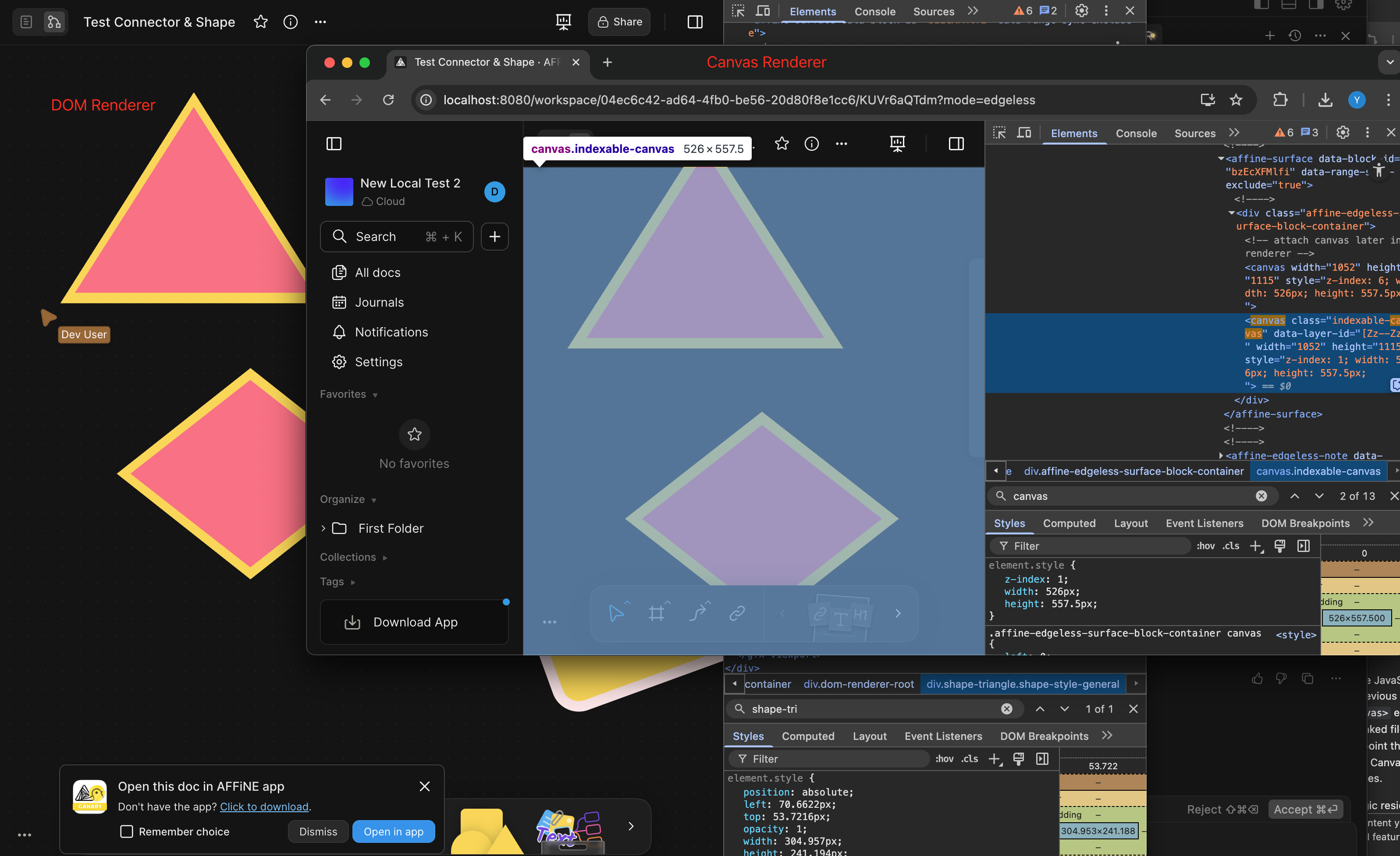
<!-- This is an auto-generated comment: release notes by coderabbit.ai -->
## Summary by CodeRabbit
- **New Features**
- Improved rendering for diamond and triangle shapes using SVG, resulting in more accurate stroke and fill display.
- **Bug Fixes**
- Ensured background and border styles do not interfere with SVG-based shapes.
- **Tests**
- Added tests to verify correct DOM rendering for diamond and triangle shapes.
- **Refactor**
- Streamlined and clarified the rendering logic for polygonal shapes, separating SVG and CSS rendering paths.
<!-- end of auto-generated comment: release notes by coderabbit.ai -->
Related to: [BS-3559](https://linear.app/affine-design/issue/BS-3559/ui-%E5%9B%BE%E7%89%87-loading-%E5%8F%98%E9%87%8F%E6%9B%B4%E6%96%B0)

<!-- This is an auto-generated comment: release notes by coderabbit.ai -->
## Summary by CodeRabbit

- **Style**
  - Improved the appearance of image loading indicators by updating background and ring colors for a more consistent visual experience.

- **New Features**
  - Added customization options for the loading icon's ring color.

- **Chores**
  - Updated the "@toeverything/theme" dependency to version ^1.1.15 across multiple packages for improved consistency and compatibility.
<!-- end of auto-generated comment: release notes by coderabbit.ai -->
<!-- This is an auto-generated comment: release notes by coderabbit.ai -->
## Summary by CodeRabbit

- **New Features**
	- Improved file selection dialogs for attachments, imports, and uploads, allowing for more consistent and streamlined file picking across the app.

- **Bug Fixes**
	- Resolved inconsistencies when selecting single or multiple files, ensuring a smoother user experience during file import and upload.

- **Refactor**
	- Unified and simplified file selection logic throughout the app for better reliability and maintainability.
	- Standardized import functions to uniformly handle arrays of files, enhancing consistency in file processing.
<!-- end of auto-generated comment: release notes by coderabbit.ai -->
Fixes [BS-2753](https://linear.app/affine-design/issue/BS-2753/)

<!-- This is an auto-generated comment: release notes by coderabbit.ai -->
## Summary by CodeRabbit

- **New Features**
  - Added snapping support when resizing elements, improving alignment and precision during resize operations.
  - Introduced new resize event handlers allowing extensions to customize resize behavior with start, move, and end callbacks.

- **Bug Fixes**
  - Improved handling of snapping state to prevent errors during drag and resize actions.

- **Tests**
  - Updated resizing tests to ensure consistent snapping behavior by removing default elements that could interfere with test results.
<!-- end of auto-generated comment: release notes by coderabbit.ai -->
Closes: [BS-3555](https://linear.app/affine-design/issue/BS-3555/ui-attachment-loading-变量更新)
Closes: [BS-3559](https://linear.app/affine-design/issue/BS-3559/ui-图片-loading-变量更新)

### Dark
<img width="625" alt="Screenshot 2025-05-26 at 20 32 36" src="https://github.com/user-attachments/assets/93501e3d-8fc6-45f9-84a0-ac147e5c5f9f" />

### Light
<img width="623" alt="Screenshot 2025-05-26 at 20 32 25" src="https://github.com/user-attachments/assets/7d5bc128-6667-45b5-982d-dab3a22706a7" />

<!-- This is an auto-generated comment: release notes by coderabbit.ai -->
## Summary by CodeRabbit

- **New Features**
  - Loading icons are now invoked as functions, allowing for more flexible and customizable rendering with parameters like size and progress.

- **Refactor**
  - Replaced theme-dependent and static loading icon references with a unified `LoadingIcon()` component across multiple components and blocks.
  - Removed legacy icon variants and simplified icon import statements, centralizing icon rendering logic.

- **Style**
  - Updated styles for loading and reload buttons to use theme-aware CSS variables.
  - Enlarged and repositioned loading indicators in image blocks for better visibility.

- **Bug Fixes**
  - Achieved consistent loading icon rendering across various blocks and components by standardizing icon invocation.
<!-- end of auto-generated comment: release notes by coderabbit.ai -->
<!-- This is an auto-generated comment: release notes by coderabbit.ai -->
## Summary by CodeRabbit

- **New Features**
  - Added the ability to select line width for pen tools, allowing users to customize brush and highlighter thickness in the toolbar menu.

- **Bug Fixes**
  - Restored and verified the functionality for adding brush elements with different sizes, ensuring accurate rendering of brush strokes based on selected size.

- **Improvements**
  - Enhanced slider component interaction by refining pointer event handling and updated slider styles for better touch interaction support.
<!-- end of auto-generated comment: release notes by coderabbit.ai -->
Fixes [BS-3528](https://linear.app/affine-design/issue/BS-3528)
Fixes [BS-3331](https://linear.app/affine-design/issue/BS-3331/frame-移动逻辑很奇怪)

### Changed
- Remove `onSelected` method from gfx view, use `handleSelection` provided by `GfxViewInteraction` instead.
- Add `selectable` to allow model to filter out itself from selection.
- Frame can be selected by body only if it's locked or its background is not transparent.

<!-- This is an auto-generated comment: release notes by coderabbit.ai -->
## Summary by CodeRabbit

- **New Features**
  - Enhanced selection behavior for frames, edgeless text, notes, and mind map elements with refined control based on lock state and background transparency.
  - Introduced group-aware selection logic promoting selection of appropriate group ancestors.
  - Added support for element selection events in interactivity extensions.

- **Bug Fixes**
  - Resolved frame selection issues by enabling selection via title clicks and restricting body selection to locked frames or those with non-transparent backgrounds.

- **Documentation**
  - Added clarifying comments for group retrieval methods.

- **Tests**
  - Updated and added end-to-end tests for frame and lock selection reflecting new selection conditions.

- **Refactor**
  - Unified and simplified selection handling by moving logic from component methods to interaction handlers and removing deprecated selection methods.
  - Streamlined selection candidate processing with extension-driven target suggestion.
  - Removed legacy group element retrieval and selection helper methods to simplify interaction logic.

- **Style**
  - Renamed types and improved type signatures for selection context and interaction configurations.
<!-- end of auto-generated comment: release notes by coderabbit.ai -->
### TL;DR

Fix presentation mode space-drag interaction by disabling black background during panning and properly restoring presentation state.

### What changed?

- Modified how the presentation tool handles state restoration after panning
- Disabled black background during space-drag and middle-mouse panning in presentation mode
- Fixed tool state management to properly restore presentation mode after space panning
- Added direct modification of the current tool's activated options instead of triggering a full tool change

### How to test?

1. Create a frame in edgeless mode
2. Enter presentation mode
3. Press space and drag to pan around
4. Verify the black background disappears during panning
5. Verify presentation mode is properly restored after releasing space
6. Try the same with middle-mouse button dragging

### Why make this change?

The black background in presentation mode was causing visibility issues during panning operations. Additionally, the presentation state wasn't being properly restored after space-drag panning. These changes improve the user experience by making content visible during navigation while maintaining the presentation mode state.

<!-- This is an auto-generated comment: release notes by coderabbit.ai -->
## Summary by CodeRabbit

- **New Features**
  - Presentation mode now automatically hides the black background overlay when dragging with the space key or middle mouse button, improving visibility during navigation.

- **Bug Fixes**
  - Improved handling of tool switching after panning in presentation mode, ensuring smoother transitions and state restoration.

- **Tests**
  - Added an end-to-end test to verify that the black background is hidden during space-drag actions in presentation mode.
<!-- end of auto-generated comment: release notes by coderabbit.ai -->
Close [BS-3305](https://linear.app/affine-design/issue/BS-3305/白板按s应该使用上次的shape形状)

<!-- This is an auto-generated comment: release notes by coderabbit.ai -->
## Summary by CodeRabbit

- **New Features**
  - Added a method to cycle through shape types when using the shape tool.

- **Bug Fixes**
  - Improved shape tool behavior to ensure the selected shape type does not change unexpectedly after adding a new shape.

- **Tests**
  - Added an end-to-end test to verify that the shape tool retains the selected shape type after adding a new shape.
  - Enhanced shortcut tests to verify cycling shapes forward and backward using 's' and 'Shift+s' keys.

- **Refactor**
  - Streamlined the logic for cycling through shape types and connector modes for improved maintainability.
  - Removed external utility for cycling shapes, integrating the functionality directly into the shape tool.
  - Updated keyboard shortcut handling to use the new cycling method within the shape tool.
<!-- end of auto-generated comment: release notes by coderabbit.ai -->
Close [BS-3519](https://linear.app/affine-design/issue/BS-3519/白板支持手写笔点写)

<!-- This is an auto-generated comment: release notes by coderabbit.ai -->
## Summary by CodeRabbit

- **New Features**
  - Introduced the ability to add new brush elements by clicking, capturing precise pointer location and pressure data when supported.

- **Bug Fixes**
  - Improved stability when updating brush elements during dragging.
<!-- end of auto-generated comment: release notes by coderabbit.ai -->
Close [BS-3507](https://linear.app/affine-design/issue/BS-3507/edgeless-text-颜色无法-undoredo)
Close [BS-3426](https://linear.app/affine-design/issue/BS-3426/frame-修改背景色后不能撤销)

This PR fixes the issue where the color change of edgeless blocks could not be undone/redone, including notes, edgeless-text, and frames. It also addresses the problem of a tiny shape being unexpectedly retained on the canvas. The key changes are:
- Removal of `transact` from the `pop` method of edgeless elements.
- Refactoring of `onPickColor` for all edgeless elements and blocks to better control the lifecycle of custom color property changes.
- Addition of the missing custom background color feature for notes.
- Addition of undo/redo color tests for notes, frames, and edgeless-text.

<!-- This is an auto-generated comment: release notes by coderabbit.ai -->
## Summary by CodeRabbit

- **New Features**
  - Added undo and redo support for color changes in frames, notes, and text blocks, allowing users to revert or reapply background and text color modifications.

- **Bug Fixes**
  - Improved reliability of color picker interactions, ensuring consistent state management and transactional updates during color changes.

- **Tests**
  - Introduced new end-to-end tests to verify undo/redo functionality for color changes in frames, notes, and text blocks.

- **Refactor**
  - Streamlined color picker event handling for better maintainability and consistency across toolbars and style panels.
  - Updated style panel structure and event handling for improved interaction and state management.
<!-- end of auto-generated comment: release notes by coderabbit.ai -->
Close [BS-3355](https://linear.app/affine-design/issue/BS-3355/白板快捷键c没有记住上次用的connector形状)

<!-- This is an auto-generated comment: release notes by coderabbit.ai -->
## Summary by CodeRabbit

- **New Features**
  - Added the ability to cycle through connector modes (Curve, Orthogonal, Straight) using the 'c' keyboard shortcut when the connector tool is active.
- **Bug Fixes**
  - Improved the logic for remembering and restoring the last used connector mode when switching between tools.
- **Tests**
  - Introduced a new end-to-end test to verify correct cycling and restoration of connector modes.
<!-- end of auto-generated comment: release notes by coderabbit.ai -->
Closes: [BS-3506](https://linear.app/affine-design/issue/BS-3506/edgeless-text-默认改为黑色)

### Dark
<img width="691" alt="Screenshot 2025-05-19 at 19 32 52" src="https://github.com/user-attachments/assets/2927d13b-0300-4293-8f8f-7891fd87a680" />

### Light
<img width="639" alt="Screenshot 2025-05-19 at 19 33 05" src="https://github.com/user-attachments/assets/4429f6f9-b374-4b17-87f4-ae09204f1538" />

<!-- This is an auto-generated comment: release notes by coderabbit.ai -->

## Summary by CodeRabbit

- **New Features**
  - Improved edgeless text block styling to support theme-based color, font, and alignment settings.

- **Style**
  - Updated the default text color in edgeless text blocks to black, with support for separate dark and light mode colors.

- **Bug Fixes**
  - Ensured the color picker and block rendering reflect the updated default color.

- **Tests**
  - Adjusted tests and snapshots to expect the new default color and theme-based color structure.

<!-- end of auto-generated comment: release notes by coderabbit.ai -->
Closes: [BS-3511](https://linear.app/affine-design/issue/BS-3511/当选中-connector-时,toolbar-上文字颜色选项颜色显示不正确)

<!-- This is an auto-generated comment: release notes by coderabbit.ai -->

## Summary by CodeRabbit

- **Tests**
  - Added end-to-end tests for the edgeless connector feature, verifying toolbar text color functionality and theme-based color changes.
- **Refactor**
  - Improved performance of text toolbar actions by optimizing internal data handling for font and color selection. No changes to visible behavior.

<!-- end of auto-generated comment: release notes by coderabbit.ai -->
Fixes [BS-3349](https://linear.app/affine-design/issue/BS-3349/)

<!-- This is an auto-generated comment: release notes by coderabbit.ai -->
## Summary by CodeRabbit

- **New Features**
  - Improved edge scrolling during selection dragging for smoother and more responsive viewport navigation.
  - Dragging area and mouse position tracking now update reactively with viewport changes, ensuring more accurate selection and movement.

- **Refactor**
  - Unified and clarified coordinate handling for dragging and mouse position, with clearer naming and separation between model and browser coordinates.
  - Simplified selection logic and removed unnecessary accumulated state for cleaner and more maintainable behavior.
  - Enhanced flexibility in coordinate conversion by allowing viewport transformations relative to arbitrary zoom and center.
  - Streamlined clipboard paste handling by simplifying mouse position extraction and adjusting attachment options.

- **Bug Fixes**
  - Enhanced overlay and dragging area accuracy by updating position calculations and coordinate transformations.
  - Fixed paste operations to correctly handle mouse position without unnecessary coordinate conversions.
  - Corrected drag initiation positions in toolbar and shape dragging to align with viewport-relative coordinates.
<!-- end of auto-generated comment: release notes by coderabbit.ai -->
<!-- This is an auto-generated comment: release notes by coderabbit.ai -->
## Summary by CodeRabbit

- **Chores**
  - Removed multiple internal export entries related to effects modules across various packages.
  - Updated dependencies and configuration references to improve internal consistency. No visible changes for end-users.
<!-- end of auto-generated comment: release notes by coderabbit.ai -->
Fixes [BS-3161](https://linear.app/affine-design/issue/BS-3161/发现已连接的connector会响应对齐线)
Fixes [BS-3337](https://linear.app/affine-design/issue/BS-3337/connector你肿么了)
Fixes [BS-3334](https://linear.app/affine-design/issue/BS-3334/connector-不应该能够被拖拽)

<!-- This is an auto-generated comment: release notes by coderabbit.ai -->

## Summary by CodeRabbit

- **Bug Fixes**
	- Corrected typos related to label editing state, ensuring more reliable label editing and display for connectors.
	- Fixed logic in the auto-complete overlay, improving when overlays appear during hover actions.

- **New Features**
	- Improved connector label handling by ensuring label state is preserved and restored during editing.
	- Enhanced connector movement behavior, allowing connectors to be moved only when appropriate elements are selected.

- **Tests**
	- Added end-to-end tests to verify connector movement and selection behaviors for improved reliability.

<!-- end of auto-generated comment: release notes by coderabbit.ai -->
Comparison:
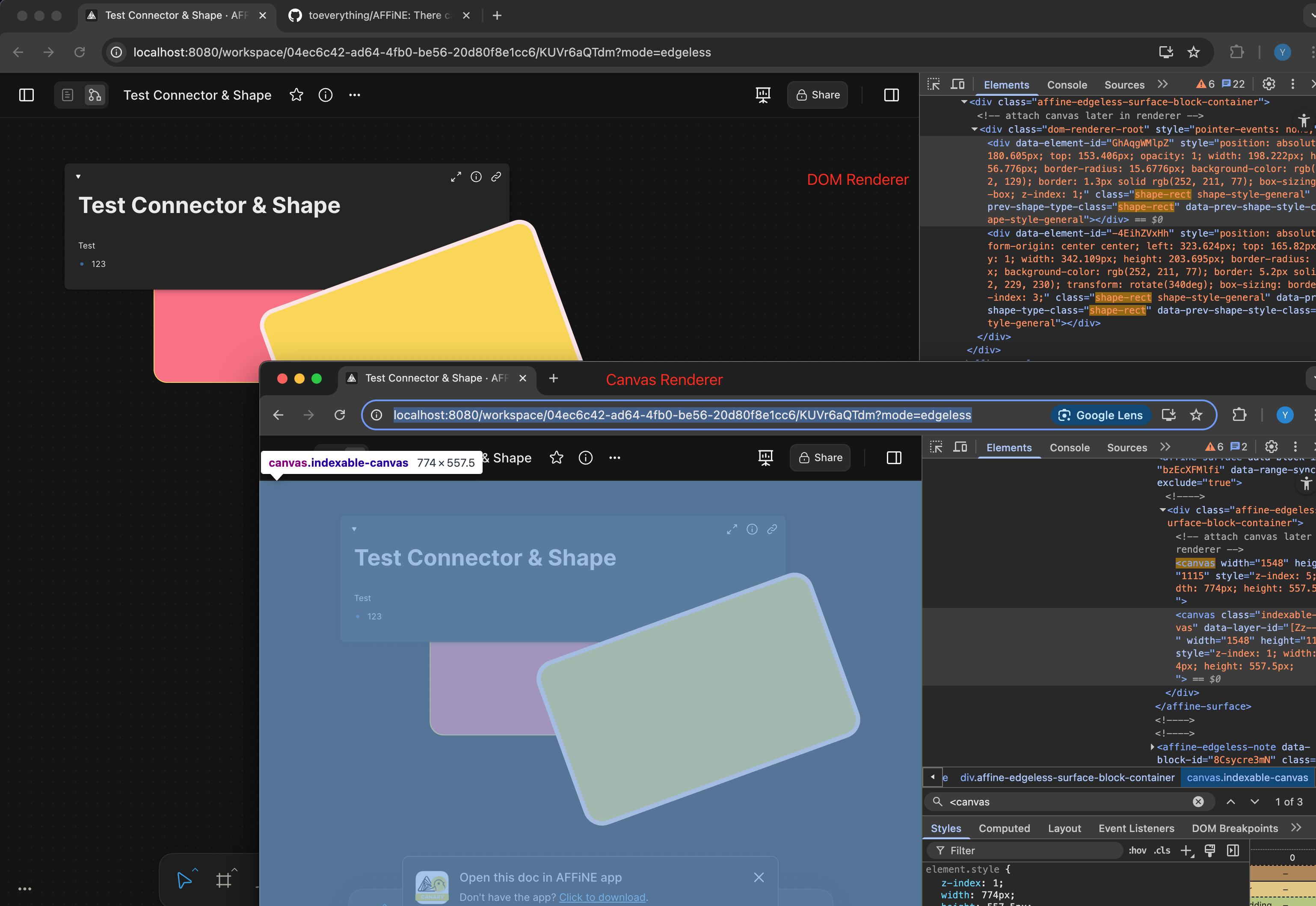
<!-- This is an auto-generated comment: release notes by coderabbit.ai -->
## Summary by CodeRabbit
- **New Features**
- Border radius and border thickness of shapes now scale dynamically with zoom level for improved visual consistency.
- **Tests**
- Added a test to ensure percentage-based border radius values are correctly rendered in the DOM.
<!-- end of auto-generated comment: release notes by coderabbit.ai -->
Fixes https://linear.app/affine-design/issue/BS-3448

Before this PR, presentation mode would force quit if user either:

1. Press space
2. Drag with mouse middle button

Unfixed behavior:

https://github.com/user-attachments/assets/8ff4e13a-69a8-4de6-8994-bf36e6e3eb49

<!-- This is an auto-generated comment: release notes by coderabbit.ai -->
## Summary by CodeRabbit

- **Bug Fixes**
	- Improved presentation mode to preserve your current panned view when exiting pan mode or toggling fullscreen, preventing unwanted viewport resets.
	- Spacebar actions are now correctly disabled when using the frame navigator tool, avoiding accidental tool switches.
- **New Features**
	- Enhanced presentation controls for smoother transitions and better handling of user navigation states.
	- Added a one-time toast notification for presentations without frames, shown only once per session for better user guidance.
<!-- end of auto-generated comment: release notes by coderabbit.ai -->
Fixes [BS-3373](https://linear.app/affine-design/issue/BS-3373/connector%E7%9A%84%E5%8F%8C%E5%87%BB%E6%B7%BB%E5%8A%A0note%E8%A1%8C%E4%B8%BA%E5%8F%97%E5%88%B0%E4%BA%86%E8%A6%86%E7%9B%96%E8%8C%83%E5%9B%B4%E7%9A%84%E5%BD%B1%E5%93%8D)

<!-- This is an auto-generated comment: release notes by coderabbit.ai -->
## Summary by CodeRabbit

- **New Features**
  - Connector label elements now include identity and creator metadata.

- **Bug Fixes**
  - Improved hit-testing for pointer interactions, resulting in more accurate detection of hovered elements.

- **Refactor**
  - Enhanced internal comparison logic for elements, improving sorting and ordering consistency.
  - Strengthened type definitions for search filters, improving result accuracy and clarity.

- **Tests**
  - Added end-to-end tests to verify correct label entry and retrieval for multiple connectors.
  - Introduced utility functions to fetch connector labels and improved connector creation in test actions.
<!-- end of auto-generated comment: release notes by coderabbit.ai -->
Closes: BS-3149

<!-- This is an auto-generated comment: release notes by coderabbit.ai -->

## Summary by CodeRabbit

- **Refactor**
  - Improved internal handling of surface components across various tools, resulting in safer and more consistent access patterns.
  - Enhanced code maintainability and reliability without altering any visible features or user workflows.

<!-- end of auto-generated comment: release notes by coderabbit.ai -->
### Changed

This pr split the old `edgeless-selected-rect` into four focused modules:

- `edgeless-selected-rect`: Provide an entry point for user operation on view layer only, no further logic here.

- `GfxViewInteractionExtension`: Allow you to plug in custom resize/rotate behaviors for block or canvas element. If you don’t register an extension, it falls back to the default behaviours.

- `InteractivityManager`: Provide the API that accepts resize/rotate requests, invokes any custom behaviors you’ve registered, tracks the lifecycle and intermediate state, then hands off to the math engine.

- `ResizeController`: A pure math engine that listens for pointer moves and pointer ups and calculates new sizes, positions, and angles. It doesn’t call any business APIs.

### Customizing an element’s resize/rotate behavior
Call `GfxViewInteractionExtension` with the element’s flavour or type plus a config object. In the config you can define:

- `resizeConstraint` (min/max width & height, lock ratio)
- `handleResize(context)` method that returns an object containing `beforeResize`、`onResizeStart`、`onResizeMove`、`onResizeEnd`
- `handleRotate(context)` method that returns an object containing `beforeRotate`、`onRotateStart`、`onRotateMove`、`onRotateEnd`

```typescript
import { GfxViewInteractionExtension } from '@blocksuite/std/gfx';

GfxViewInteractionExtension(
  flavourOrElementType,
  {
    resizeConstraint: {
      minWidth,
      maxWidth,
      lockRatio,
      minHeight,
      maxHeight
    },
    handleResize(context) {
      return {
        beforeResize(context) {},
        onResizeStart(context) {},
        onResizeMove(context) {},
        onResizeEnd(context) {}
      };
    },
    handleRotate(context) {
      return {
        beforeRotate(context) {},
        onRotateStart(context) {},
        onRotateMove(context) {},
        onRotateEnd(context) {}
      };
    }
  }
);
```

<!-- This is an auto-generated comment: release notes by coderabbit.ai -->
## Summary by CodeRabbit

- **New Features**
  - Added interaction extensions for edgeless variants of attachment, bookmark, edgeless text, embedded docs, images, notes, frames, AI chat blocks, and various embed blocks (Figma, GitHub, HTML, iframe, Loom, YouTube).
  - Introduced interaction extensions for graphical elements including connectors, groups, mind maps, shapes, and text, supporting constrained resizing and rotation disabling where applicable.
  - Implemented a unified interaction extension framework enabling configurable resize and rotate lifecycle handlers.
  - Enhanced autocomplete overlay behavior based on selection context.

- **Refactor**
  - Removed legacy resize manager and element-specific resize/rotate logic, replacing with a centralized, extensible interaction system.
  - Simplified resize handle rendering to a data-driven approach with improved cursor management.
  - Replaced complex cursor rotation calculations with fixed-angle mappings for resize handles.
  - Streamlined selection rectangle component to use interactivity services for resize and rotate handling.

- **Bug Fixes**
  - Fixed connector update triggers to reduce unnecessary updates.
  - Improved resize constraints enforcement and interaction state tracking.

- **Tests**
  - Refined end-to-end tests to use higher-level resize utilities and added finer-grained assertions on element dimensions.
  - Enhanced mouse movement granularity in drag tests for better simulation fidelity.

- **Chores**
  - Added new workspace dependencies and project references for the interaction framework modules.
  - Extended public API exports to include new interaction types and extensions.
<!-- end of auto-generated comment: release notes by coderabbit.ai -->
<!-- This is an auto-generated comment: release notes by coderabbit.ai -->

## Summary by CodeRabbit

- **Refactor**
  - Unified internal data access by replacing all references from `doc` to `store` across all components, blocks, widgets, and utilities. This affects how readonly state, block operations, and service retrieval are handled throughout the application.
- **Tests**
  - Updated all test utilities and test cases to use `store` instead of `doc` for document-related operations.
- **Chores**
  - Updated context providers and property names to reflect the change from `doc` to `store` for improved consistency and maintainability.

No user-facing features or behaviors have changed.

<!-- end of auto-generated comment: release notes by coderabbit.ai -->
 DarkSky

