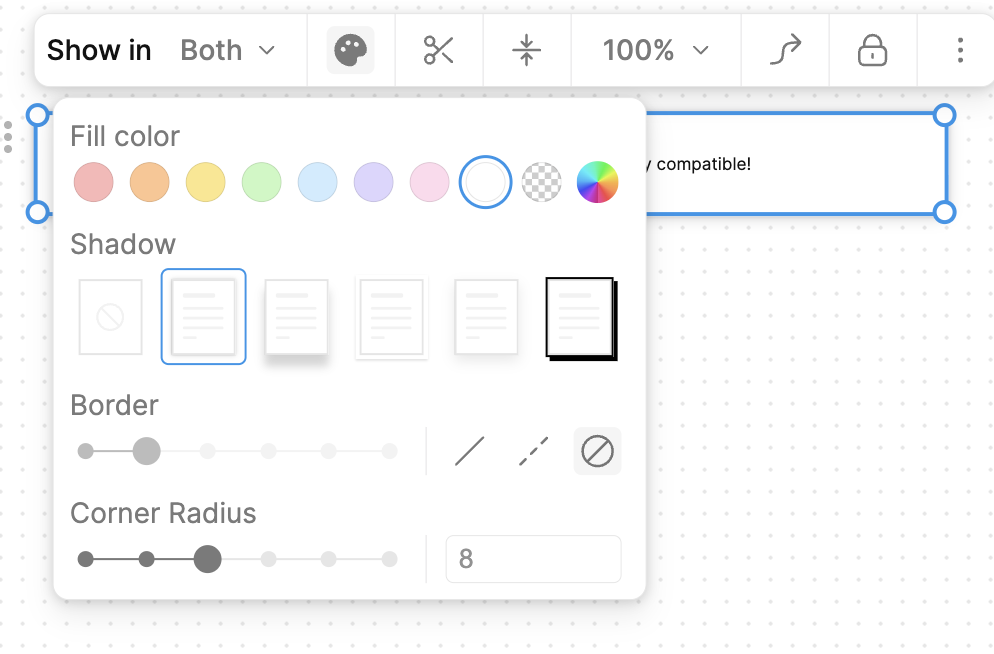
Fixes [BS-3528](https://linear.app/affine-design/issue/BS-3528)
Fixes [BS-3331](https://linear.app/affine-design/issue/BS-3331/frame-移动逻辑很奇怪)

### Changed
- Remove `onSelected` method from gfx view, use `handleSelection` provided by `GfxViewInteraction` instead.
- Add `selectable` to allow model to filter out itself from selection.
- Frame can be selected by body only if it's locked or its background is not transparent.

<!-- This is an auto-generated comment: release notes by coderabbit.ai -->
## Summary by CodeRabbit

- **New Features**
  - Enhanced selection behavior for frames, edgeless text, notes, and mind map elements with refined control based on lock state and background transparency.
  - Introduced group-aware selection logic promoting selection of appropriate group ancestors.
  - Added support for element selection events in interactivity extensions.

- **Bug Fixes**
  - Resolved frame selection issues by enabling selection via title clicks and restricting body selection to locked frames or those with non-transparent backgrounds.

- **Documentation**
  - Added clarifying comments for group retrieval methods.

- **Tests**
  - Updated and added end-to-end tests for frame and lock selection reflecting new selection conditions.

- **Refactor**
  - Unified and simplified selection handling by moving logic from component methods to interaction handlers and removing deprecated selection methods.
  - Streamlined selection candidate processing with extension-driven target suggestion.
  - Removed legacy group element retrieval and selection helper methods to simplify interaction logic.

- **Style**
  - Renamed types and improved type signatures for selection context and interaction configurations.
<!-- end of auto-generated comment: release notes by coderabbit.ai -->
### TL;DR

Fix presentation mode space-drag interaction by disabling black background during panning and properly restoring presentation state.

### What changed?

- Modified how the presentation tool handles state restoration after panning
- Disabled black background during space-drag and middle-mouse panning in presentation mode
- Fixed tool state management to properly restore presentation mode after space panning
- Added direct modification of the current tool's activated options instead of triggering a full tool change

### How to test?

1. Create a frame in edgeless mode
2. Enter presentation mode
3. Press space and drag to pan around
4. Verify the black background disappears during panning
5. Verify presentation mode is properly restored after releasing space
6. Try the same with middle-mouse button dragging

### Why make this change?

The black background in presentation mode was causing visibility issues during panning operations. Additionally, the presentation state wasn't being properly restored after space-drag panning. These changes improve the user experience by making content visible during navigation while maintaining the presentation mode state.

<!-- This is an auto-generated comment: release notes by coderabbit.ai -->
## Summary by CodeRabbit

- **New Features**
  - Presentation mode now automatically hides the black background overlay when dragging with the space key or middle mouse button, improving visibility during navigation.

- **Bug Fixes**
  - Improved handling of tool switching after panning in presentation mode, ensuring smoother transitions and state restoration.

- **Tests**
  - Added an end-to-end test to verify that the black background is hidden during space-drag actions in presentation mode.
<!-- end of auto-generated comment: release notes by coderabbit.ai -->
Close [BS-3305](https://linear.app/affine-design/issue/BS-3305/白板按s应该使用上次的shape形状)

<!-- This is an auto-generated comment: release notes by coderabbit.ai -->
## Summary by CodeRabbit

- **New Features**
  - Added a method to cycle through shape types when using the shape tool.

- **Bug Fixes**
  - Improved shape tool behavior to ensure the selected shape type does not change unexpectedly after adding a new shape.

- **Tests**
  - Added an end-to-end test to verify that the shape tool retains the selected shape type after adding a new shape.
  - Enhanced shortcut tests to verify cycling shapes forward and backward using 's' and 'Shift+s' keys.

- **Refactor**
  - Streamlined the logic for cycling through shape types and connector modes for improved maintainability.
  - Removed external utility for cycling shapes, integrating the functionality directly into the shape tool.
  - Updated keyboard shortcut handling to use the new cycling method within the shape tool.
<!-- end of auto-generated comment: release notes by coderabbit.ai -->
Close [BS-3507](https://linear.app/affine-design/issue/BS-3507/edgeless-text-颜色无法-undoredo)
Close [BS-3426](https://linear.app/affine-design/issue/BS-3426/frame-修改背景色后不能撤销)

This PR fixes the issue where the color change of edgeless blocks could not be undone/redone, including notes, edgeless-text, and frames. It also addresses the problem of a tiny shape being unexpectedly retained on the canvas. The key changes are:
- Removal of `transact` from the `pop` method of edgeless elements.
- Refactoring of `onPickColor` for all edgeless elements and blocks to better control the lifecycle of custom color property changes.
- Addition of the missing custom background color feature for notes.
- Addition of undo/redo color tests for notes, frames, and edgeless-text.

<!-- This is an auto-generated comment: release notes by coderabbit.ai -->
## Summary by CodeRabbit

- **New Features**
  - Added undo and redo support for color changes in frames, notes, and text blocks, allowing users to revert or reapply background and text color modifications.

- **Bug Fixes**
  - Improved reliability of color picker interactions, ensuring consistent state management and transactional updates during color changes.

- **Tests**
  - Introduced new end-to-end tests to verify undo/redo functionality for color changes in frames, notes, and text blocks.

- **Refactor**
  - Streamlined color picker event handling for better maintainability and consistency across toolbars and style panels.
  - Updated style panel structure and event handling for improved interaction and state management.
<!-- end of auto-generated comment: release notes by coderabbit.ai -->
Close [BS-3355](https://linear.app/affine-design/issue/BS-3355/白板快捷键c没有记住上次用的connector形状)

<!-- This is an auto-generated comment: release notes by coderabbit.ai -->
## Summary by CodeRabbit

- **New Features**
  - Added the ability to cycle through connector modes (Curve, Orthogonal, Straight) using the 'c' keyboard shortcut when the connector tool is active.
- **Bug Fixes**
  - Improved the logic for remembering and restoring the last used connector mode when switching between tools.
- **Tests**
  - Introduced a new end-to-end test to verify correct cycling and restoration of connector modes.
<!-- end of auto-generated comment: release notes by coderabbit.ai -->
Close [BS-3512](https://linear.app/affine-design/issue/BS-3512/bug-note-选中状态会穿透-toolbar)

<!-- This is an auto-generated comment: release notes by coderabbit.ai -->

## Summary by CodeRabbit

- **Tests**
  - Added a new end-to-end test to verify that selection handles are visually and interactively layered beneath the edgeless element toolbar in the editor.

<!-- end of auto-generated comment: release notes by coderabbit.ai -->
Close [BS-3500](https://linear.app/affine-design/issue/BS-3500/剪刀没问题了,通过拖动形成的段落能不能也有同样的表现?)

<!-- This is an auto-generated comment: release notes by coderabbit.ai -->

## Summary by CodeRabbit

- **Bug Fixes**
  - Improved the behavior when dragging blocks between notes, ensuring that new note blocks are inserted as siblings when appropriate, instead of always creating them at the root level.

- **Tests**
  - Enhanced and enabled tests to verify correct drag-and-drop behavior across multiple notes and to ensure the relative order of note content is preserved during drag operations.

<!-- end of auto-generated comment: release notes by coderabbit.ai -->
Fixes [BS-3161](https://linear.app/affine-design/issue/BS-3161/发现已连接的connector会响应对齐线)
Fixes [BS-3337](https://linear.app/affine-design/issue/BS-3337/connector你肿么了)
Fixes [BS-3334](https://linear.app/affine-design/issue/BS-3334/connector-不应该能够被拖拽)

<!-- This is an auto-generated comment: release notes by coderabbit.ai -->

## Summary by CodeRabbit

- **Bug Fixes**
	- Corrected typos related to label editing state, ensuring more reliable label editing and display for connectors.
	- Fixed logic in the auto-complete overlay, improving when overlays appear during hover actions.

- **New Features**
	- Improved connector label handling by ensuring label state is preserved and restored during editing.
	- Enhanced connector movement behavior, allowing connectors to be moved only when appropriate elements are selected.

- **Tests**
	- Added end-to-end tests to verify connector movement and selection behaviors for improved reliability.

<!-- end of auto-generated comment: release notes by coderabbit.ai -->
Fixes [BS-3373](https://linear.app/affine-design/issue/BS-3373/connector%E7%9A%84%E5%8F%8C%E5%87%BB%E6%B7%BB%E5%8A%A0note%E8%A1%8C%E4%B8%BA%E5%8F%97%E5%88%B0%E4%BA%86%E8%A6%86%E7%9B%96%E8%8C%83%E5%9B%B4%E7%9A%84%E5%BD%B1%E5%93%8D)

<!-- This is an auto-generated comment: release notes by coderabbit.ai -->
## Summary by CodeRabbit

- **New Features**
  - Connector label elements now include identity and creator metadata.

- **Bug Fixes**
  - Improved hit-testing for pointer interactions, resulting in more accurate detection of hovered elements.

- **Refactor**
  - Enhanced internal comparison logic for elements, improving sorting and ordering consistency.
  - Strengthened type definitions for search filters, improving result accuracy and clarity.

- **Tests**
  - Added end-to-end tests to verify correct label entry and retrieval for multiple connectors.
  - Introduced utility functions to fetch connector labels and improved connector creation in test actions.
<!-- end of auto-generated comment: release notes by coderabbit.ai -->
### Changed

This pr split the old `edgeless-selected-rect` into four focused modules:

- `edgeless-selected-rect`: Provide an entry point for user operation on view layer only, no further logic here.

- `GfxViewInteractionExtension`: Allow you to plug in custom resize/rotate behaviors for block or canvas element. If you don’t register an extension, it falls back to the default behaviours.

- `InteractivityManager`: Provide the API that accepts resize/rotate requests, invokes any custom behaviors you’ve registered, tracks the lifecycle and intermediate state, then hands off to the math engine.

- `ResizeController`: A pure math engine that listens for pointer moves and pointer ups and calculates new sizes, positions, and angles. It doesn’t call any business APIs.

### Customizing an element’s resize/rotate behavior
Call `GfxViewInteractionExtension` with the element’s flavour or type plus a config object. In the config you can define:

- `resizeConstraint` (min/max width & height, lock ratio)
- `handleResize(context)` method that returns an object containing `beforeResize`、`onResizeStart`、`onResizeMove`、`onResizeEnd`
- `handleRotate(context)` method that returns an object containing `beforeRotate`、`onRotateStart`、`onRotateMove`、`onRotateEnd`

```typescript
import { GfxViewInteractionExtension } from '@blocksuite/std/gfx';

GfxViewInteractionExtension(
  flavourOrElementType,
  {
    resizeConstraint: {
      minWidth,
      maxWidth,
      lockRatio,
      minHeight,
      maxHeight
    },
    handleResize(context) {
      return {
        beforeResize(context) {},
        onResizeStart(context) {},
        onResizeMove(context) {},
        onResizeEnd(context) {}
      };
    },
    handleRotate(context) {
      return {
        beforeRotate(context) {},
        onRotateStart(context) {},
        onRotateMove(context) {},
        onRotateEnd(context) {}
      };
    }
  }
);
```

<!-- This is an auto-generated comment: release notes by coderabbit.ai -->
## Summary by CodeRabbit

- **New Features**
  - Added interaction extensions for edgeless variants of attachment, bookmark, edgeless text, embedded docs, images, notes, frames, AI chat blocks, and various embed blocks (Figma, GitHub, HTML, iframe, Loom, YouTube).
  - Introduced interaction extensions for graphical elements including connectors, groups, mind maps, shapes, and text, supporting constrained resizing and rotation disabling where applicable.
  - Implemented a unified interaction extension framework enabling configurable resize and rotate lifecycle handlers.
  - Enhanced autocomplete overlay behavior based on selection context.

- **Refactor**
  - Removed legacy resize manager and element-specific resize/rotate logic, replacing with a centralized, extensible interaction system.
  - Simplified resize handle rendering to a data-driven approach with improved cursor management.
  - Replaced complex cursor rotation calculations with fixed-angle mappings for resize handles.
  - Streamlined selection rectangle component to use interactivity services for resize and rotate handling.

- **Bug Fixes**
  - Fixed connector update triggers to reduce unnecessary updates.
  - Improved resize constraints enforcement and interaction state tracking.

- **Tests**
  - Refined end-to-end tests to use higher-level resize utilities and added finer-grained assertions on element dimensions.
  - Enhanced mouse movement granularity in drag tests for better simulation fidelity.

- **Chores**
  - Added new workspace dependencies and project references for the interaction framework modules.
  - Extended public API exports to include new interaction types and extensions.
<!-- end of auto-generated comment: release notes by coderabbit.ai -->
<!-- This is an auto-generated comment: release notes by coderabbit.ai -->
## Summary by CodeRabbit

- **New Features**
  - Introduced a new slider component for line width selection, providing a more interactive and streamlined UI.
  - Added support for using the slider component across relevant panels.
- **Improvements**
  - Simplified the line width selection panel for easier use and improved maintainability.
  - Enhanced event handling to prevent dropdowns from closing when interacting with the panel.
- **Bug Fixes**
  - Improved event propagation control within the line styles panel.
- **Chores**
  - Updated package exports to include the new slider component.
<!-- end of auto-generated comment: release notes by coderabbit.ai -->
Close [BS-3268](https://linear.app/affine-design/issue/BS-3268/edgeless-下,-dark-mode-embed的配色应该更加清晰)
Close [BS-3067](https://linear.app/affine-design/issue/BS-3067/在embed上,添加split-view等相关的操作入口,基本接近page-block(见设计稿))

<!-- This is an auto-generated comment: release notes by coderabbit.ai -->
## Summary by CodeRabbit

- **New Features**
  - Introduced an interactive header for embedded synced documents with fold/unfold toggle, document opening, and multiple view options.
  - Added info and copy link buttons for embedded synced documents and notes to improve document management and sharing.
- **Enhancements**
  - Updated styles for embedded synced document blocks and headers for better visual consistency.
  - Added new localization entries for header actions: "Fold", "Unfold", and "Open".
  - Disabled redundant open document actions in toolbars, centralizing controls in the header.
- **Refactor**
  - Unified header button components for notes and embedded synced documents into reusable components.
  - Simplified header components by delegating button behaviors to shared components.
- **Bug Fixes**
  - Fixed conditional rendering of editor content in embedded synced documents when folded.
- **Chores**
  - Upgraded theme dependency version from "^1.1.12" to "^1.1.14" across multiple packages.
<!-- end of auto-generated comment: release notes by coderabbit.ai -->
Close [BS-3066](https://linear.app/affine-design/issue/BS-3066/优化长note的展示和折叠)

- Enhanced the visibility behavior of hidden content in edgeless notes by:
  - Showing hidden content when a note is being edited, even when it's outside the viewport
  - Improving hover behavior with a delay when leaving from the bottom of the note
  - Adding proper cleanup of hover timeouts when the component is disconnected
  - Optimizing the viewport element to keep editing blocks or elements visible

## Testing
- Added new E2E test cases covering:
  - Hover behavior on selected notes
  - Content visibility during editing
  - Viewport scrolling behavior
  - Edge cases for content visibility

## Impact
This change improves the user experience when working with collapsed notes in edgeless mode by making the content more accessible and preventing accidental content hiding during editing.

<!-- This is an auto-generated comment: release notes by coderabbit.ai -->
## Summary by CodeRabbit

- **Bug Fixes**
	- Improved visibility of hidden content in edgeless notes when hovering near the bottom edge or editing the note, especially after resizing or clipping.
- **New Features**
	- Enhanced hover behavior with delayed clearing based on mouse position to improve user experience.
- **Tests**
	- Added new tests verifying hidden content visibility in edgeless notes during hover and editing, simulating diverse user interactions.
- **Chores**
	- Added utilities to get and set viewport center for improved test control.
<!-- end of auto-generated comment: release notes by coderabbit.ai -->
Sometimes, missing `await` in the test code can cause timing issues, leading to test failures. This PR enables the `no-floating-promises` rule for the test code to ensure that such errors do not occur.
### What Changes
- Refactors the `notify` function call with undo button. It is called `notifyWithUndo`, which can  associate the visibility of the `NotificationCard` with the top undo item in history stack, such as undo by shortcut `Cmd+Z`.
- change icon of the "Insert into page" button. Close [BS-3267](https://linear.app/affine-design/issue/BS-3267/frame和group的insert-into-page图标也更换一下)
### Changed
- Rewrite box selection in `default-tool`, the view can decide whether to be selected in box selection by return a boolean value in `onBoxSelected` method
- Cleanup unnecessary states in `default-tool` and some naming problem
Close [BS-3029](https://linear.app/affine-design/issue/BS-3029/frame-里面的-shape-没办法进入文本编辑模式)
Close [BS-3082](https://linear.app/affine-design/issue/BS-3082/按s切换至shape工具,在白板上点击会创建两个shape)
Close [BS-3091](https://linear.app/affine-design/issue/BS-3082/按s切换至shape工具,在白板上点击会创建两个shape)

## Fix Shape Tool Issues

This PR addresses several issues with the shape and mindmap tools functionality in the editor:

1. **Fix text editing after mode switching**: Resolves an issue where users couldn't edit text in shapes after switching editor modes. The fix ensures the edgeless block is properly retrieved when double-clicking on a shape.

2. **Improve tool switching behavior**: Fixes issues with tool overlays not showing or being repeated when switching between tools. This includes:
   - Properly handling tool overlay visibility
   - Ensuring only one tool is active at a time when using keyboard shortcuts
   - Adding proper cleanup when switching tools

3. **Add comprehensive tests**: Adds new test cases to verify:
   - Shape creation with keyboard shortcuts
   - Shape text editing after mode switching
   - Tool switching behavior with keyboard shortcuts
Close [BS-2866](https://linear.app/affine-design/issue/BS-2866/presentation-mode中的note消失)

## Problem
When using RequestAnimationFrame (RAF) for GFX block updates, there was a timing issue where the transform update would lag behind the RAF callback, causing the block to display with the previous frame's transform state.

## Solution
1. Refactored the block state management to use signals for better reactivity
2. Moved block visibility state management from `viewport-element.ts` to `gfx-block-component.ts`
3. Added `transformState$` signal to track block state
4. Synchronized transform updates with RAF using `effect` to ensure updates happen in the correct frame
5. Added test case to verify note visibility in presentation mode
Closes: [BS-2909](https://linear.app/affine-design/issue/BS-2909/新增highlighter)

### What's Changed!

Currently the highlighter tool is very similar to brush, but for the future, it's a standalone module.

* Added `Highlighter` element model
* Added `Highlighter` tool
* Added `Highlighter` entry to the global toolbar
continue #10824

### Changed
- Moved double-click-to-edit behavior from the default tool to individual model views
- Introduced `onSelected` callback interface in gfx view components to allows developers to override default selection logic
 doouding