## New Features
* **Block Meta Markdown Adapter**:Inject the Block's metadata into
Markdown.
* **UI**:Apply interaction
   * **Widget**
* Block-Level Widget: Displays the diffs of individual blocks within the
main content and supports accepting/rejecting individual diffs.
* Page-Level Widget: Displays global options (Accept all/Reject all).
   * **Block Diff Service**:Bridge widget and diff data
* Widget subscribes to DiffMap(RenderDiff) data, refreshing the view
when the data changes.
* Widget performs operations such as Accept/Reject via methods provided
by Service.
   * **Doc Edit Tool Card**:
     * Display apply preview of semantic doc edit
     * Support apply & accept/reject to the main content
* **Apply Playground**:A devtool for testing apply new content to
current

> CLOSE AI-274 AI-275 AI-276  AI-278

<!-- This is an auto-generated comment: release notes by coderabbit.ai
-->
## Summary by CodeRabbit

* **New Features**
* Introduced block-level markdown diffing with accept/reject controls
for insertions, deletions, and updates.
* Added block diff widgets for individual blocks and pages, featuring
navigation and bulk accept/reject actions.
* Provided a block diff playground for testing and previewing markdown
changes (development mode only).
* Added a new document editing AI tool component with interactive diff
viewing and change application.
* Supported rendering of the document editing tool within AI chat
content streams.

* **Improvements**
* Enhanced widget rendering in list, paragraph, data view, and database
blocks for improved extensibility.
* Improved widget flavour matching with hierarchical wildcard support
for more flexible UI integration.

* **Chores**
* Updated the "@toeverything/theme" dependency to version ^1.1.16 across
multiple packages.
* Added new workspace dependencies for core frontend packages to improve
module linkage.
* Extended global styles with visual highlights for deleted blocks in AI
block diff feature.
<!-- end of auto-generated comment: release notes by coderabbit.ai -->
Close [BS-3351](https://linear.app/affine-design/issue/BS-3351/无法通过拖拽frame-title来拖拽frame)

<!-- This is an auto-generated comment: release notes by coderabbit.ai -->
## Summary by CodeRabbit

- **New Features**
  - Improved rendering performance and consistency for widgets within frames.
  - Frame titles are now directly associated with individual frames and are draggable.

- **Bug Fixes**
  - Selection logic for frames has been refined to better handle locked states and title area interactions.

- **Refactor**
  - Frame title widget and related components have been simplified for clarity and maintainability.
  - Removed dynamic positioning and click toggling from frame titles for a cleaner interaction model.

- **Tests**
  - Added a test to verify that frame titles are draggable.
  - Temporarily disabled tests related to frame title stacking and selection due to ongoing changes.
<!-- end of auto-generated comment: release notes by coderabbit.ai -->
Related to: [BS-3559](https://linear.app/affine-design/issue/BS-3559/ui-%E5%9B%BE%E7%89%87-loading-%E5%8F%98%E9%87%8F%E6%9B%B4%E6%96%B0)

<!-- This is an auto-generated comment: release notes by coderabbit.ai -->
## Summary by CodeRabbit

- **Style**
  - Improved the appearance of image loading indicators by updating background and ring colors for a more consistent visual experience.

- **New Features**
  - Added customization options for the loading icon's ring color.

- **Chores**
  - Updated the "@toeverything/theme" dependency to version ^1.1.15 across multiple packages for improved consistency and compatibility.
<!-- end of auto-generated comment: release notes by coderabbit.ai -->
Fixes [BS-3528](https://linear.app/affine-design/issue/BS-3528)
Fixes [BS-3331](https://linear.app/affine-design/issue/BS-3331/frame-移动逻辑很奇怪)

### Changed
- Remove `onSelected` method from gfx view, use `handleSelection` provided by `GfxViewInteraction` instead.
- Add `selectable` to allow model to filter out itself from selection.
- Frame can be selected by body only if it's locked or its background is not transparent.

<!-- This is an auto-generated comment: release notes by coderabbit.ai -->
## Summary by CodeRabbit

- **New Features**
  - Enhanced selection behavior for frames, edgeless text, notes, and mind map elements with refined control based on lock state and background transparency.
  - Introduced group-aware selection logic promoting selection of appropriate group ancestors.
  - Added support for element selection events in interactivity extensions.

- **Bug Fixes**
  - Resolved frame selection issues by enabling selection via title clicks and restricting body selection to locked frames or those with non-transparent backgrounds.

- **Documentation**
  - Added clarifying comments for group retrieval methods.

- **Tests**
  - Updated and added end-to-end tests for frame and lock selection reflecting new selection conditions.

- **Refactor**
  - Unified and simplified selection handling by moving logic from component methods to interaction handlers and removing deprecated selection methods.
  - Streamlined selection candidate processing with extension-driven target suggestion.
  - Removed legacy group element retrieval and selection helper methods to simplify interaction logic.

- **Style**
  - Renamed types and improved type signatures for selection context and interaction configurations.
<!-- end of auto-generated comment: release notes by coderabbit.ai -->
### TL;DR

Fix presentation mode space-drag interaction by disabling black background during panning and properly restoring presentation state.

### What changed?

- Modified how the presentation tool handles state restoration after panning
- Disabled black background during space-drag and middle-mouse panning in presentation mode
- Fixed tool state management to properly restore presentation mode after space panning
- Added direct modification of the current tool's activated options instead of triggering a full tool change

### How to test?

1. Create a frame in edgeless mode
2. Enter presentation mode
3. Press space and drag to pan around
4. Verify the black background disappears during panning
5. Verify presentation mode is properly restored after releasing space
6. Try the same with middle-mouse button dragging

### Why make this change?

The black background in presentation mode was causing visibility issues during panning operations. Additionally, the presentation state wasn't being properly restored after space-drag panning. These changes improve the user experience by making content visible during navigation while maintaining the presentation mode state.

<!-- This is an auto-generated comment: release notes by coderabbit.ai -->
## Summary by CodeRabbit

- **New Features**
  - Presentation mode now automatically hides the black background overlay when dragging with the space key or middle mouse button, improving visibility during navigation.

- **Bug Fixes**
  - Improved handling of tool switching after panning in presentation mode, ensuring smoother transitions and state restoration.

- **Tests**
  - Added an end-to-end test to verify that the black background is hidden during space-drag actions in presentation mode.
<!-- end of auto-generated comment: release notes by coderabbit.ai -->
Close [BS-3507](https://linear.app/affine-design/issue/BS-3507/edgeless-text-颜色无法-undoredo)
Close [BS-3426](https://linear.app/affine-design/issue/BS-3426/frame-修改背景色后不能撤销)

This PR fixes the issue where the color change of edgeless blocks could not be undone/redone, including notes, edgeless-text, and frames. It also addresses the problem of a tiny shape being unexpectedly retained on the canvas. The key changes are:
- Removal of `transact` from the `pop` method of edgeless elements.
- Refactoring of `onPickColor` for all edgeless elements and blocks to better control the lifecycle of custom color property changes.
- Addition of the missing custom background color feature for notes.
- Addition of undo/redo color tests for notes, frames, and edgeless-text.

<!-- This is an auto-generated comment: release notes by coderabbit.ai -->
## Summary by CodeRabbit

- **New Features**
  - Added undo and redo support for color changes in frames, notes, and text blocks, allowing users to revert or reapply background and text color modifications.

- **Bug Fixes**
  - Improved reliability of color picker interactions, ensuring consistent state management and transactional updates during color changes.

- **Tests**
  - Introduced new end-to-end tests to verify undo/redo functionality for color changes in frames, notes, and text blocks.

- **Refactor**
  - Streamlined color picker event handling for better maintainability and consistency across toolbars and style panels.
  - Updated style panel structure and event handling for improved interaction and state management.
<!-- end of auto-generated comment: release notes by coderabbit.ai -->
<!-- This is an auto-generated comment: release notes by coderabbit.ai -->
## Summary by CodeRabbit

- **Chores**
  - Removed multiple internal export entries related to effects modules across various packages.
  - Updated dependencies and configuration references to improve internal consistency. No visible changes for end-users.
<!-- end of auto-generated comment: release notes by coderabbit.ai -->
Fixes https://linear.app/affine-design/issue/BS-3448

Before this PR, presentation mode would force quit if user either:

1. Press space
2. Drag with mouse middle button

Unfixed behavior:

https://github.com/user-attachments/assets/8ff4e13a-69a8-4de6-8994-bf36e6e3eb49

<!-- This is an auto-generated comment: release notes by coderabbit.ai -->
## Summary by CodeRabbit

- **Bug Fixes**
	- Improved presentation mode to preserve your current panned view when exiting pan mode or toggling fullscreen, preventing unwanted viewport resets.
	- Spacebar actions are now correctly disabled when using the frame navigator tool, avoiding accidental tool switches.
- **New Features**
	- Enhanced presentation controls for smoother transitions and better handling of user navigation states.
	- Added a one-time toast notification for presentations without frames, shown only once per session for better user guidance.
<!-- end of auto-generated comment: release notes by coderabbit.ai -->
Fixed this issue (black background is on but the toggle state is not synced):
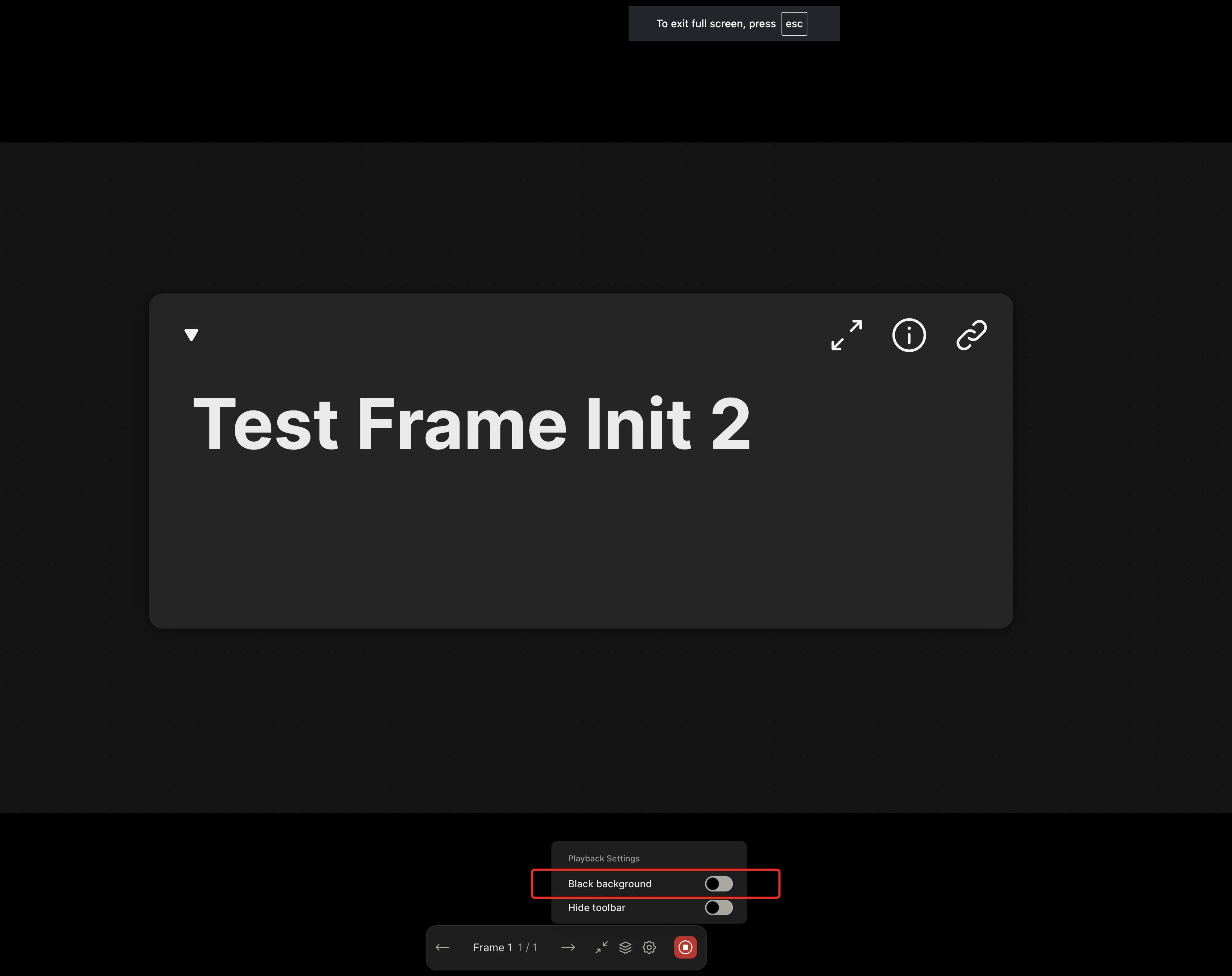
Issue source: https://linear.app/affine-design/issue/BS-3448
<!-- This is an auto-generated comment: release notes by coderabbit.ai -->
## Summary by CodeRabbit
- **Bug Fixes**
- The background color now defaults to non-black for new users or when no previous setting exists.
- Improved reliability when restoring user settings.
- **New Features**
- Changes to the background color setting are now saved and persist between sessions.
- **Style**
- Enhanced toggle switch responsiveness for background and toolbar settings.
<!-- end of auto-generated comment: release notes by coderabbit.ai -->
### Changed

This pr split the old `edgeless-selected-rect` into four focused modules:

- `edgeless-selected-rect`: Provide an entry point for user operation on view layer only, no further logic here.

- `GfxViewInteractionExtension`: Allow you to plug in custom resize/rotate behaviors for block or canvas element. If you don’t register an extension, it falls back to the default behaviours.

- `InteractivityManager`: Provide the API that accepts resize/rotate requests, invokes any custom behaviors you’ve registered, tracks the lifecycle and intermediate state, then hands off to the math engine.

- `ResizeController`: A pure math engine that listens for pointer moves and pointer ups and calculates new sizes, positions, and angles. It doesn’t call any business APIs.

### Customizing an element’s resize/rotate behavior
Call `GfxViewInteractionExtension` with the element’s flavour or type plus a config object. In the config you can define:

- `resizeConstraint` (min/max width & height, lock ratio)
- `handleResize(context)` method that returns an object containing `beforeResize`、`onResizeStart`、`onResizeMove`、`onResizeEnd`
- `handleRotate(context)` method that returns an object containing `beforeRotate`、`onRotateStart`、`onRotateMove`、`onRotateEnd`

```typescript
import { GfxViewInteractionExtension } from '@blocksuite/std/gfx';

GfxViewInteractionExtension(
  flavourOrElementType,
  {
    resizeConstraint: {
      minWidth,
      maxWidth,
      lockRatio,
      minHeight,
      maxHeight
    },
    handleResize(context) {
      return {
        beforeResize(context) {},
        onResizeStart(context) {},
        onResizeMove(context) {},
        onResizeEnd(context) {}
      };
    },
    handleRotate(context) {
      return {
        beforeRotate(context) {},
        onRotateStart(context) {},
        onRotateMove(context) {},
        onRotateEnd(context) {}
      };
    }
  }
);
```

<!-- This is an auto-generated comment: release notes by coderabbit.ai -->
## Summary by CodeRabbit

- **New Features**
  - Added interaction extensions for edgeless variants of attachment, bookmark, edgeless text, embedded docs, images, notes, frames, AI chat blocks, and various embed blocks (Figma, GitHub, HTML, iframe, Loom, YouTube).
  - Introduced interaction extensions for graphical elements including connectors, groups, mind maps, shapes, and text, supporting constrained resizing and rotation disabling where applicable.
  - Implemented a unified interaction extension framework enabling configurable resize and rotate lifecycle handlers.
  - Enhanced autocomplete overlay behavior based on selection context.

- **Refactor**
  - Removed legacy resize manager and element-specific resize/rotate logic, replacing with a centralized, extensible interaction system.
  - Simplified resize handle rendering to a data-driven approach with improved cursor management.
  - Replaced complex cursor rotation calculations with fixed-angle mappings for resize handles.
  - Streamlined selection rectangle component to use interactivity services for resize and rotate handling.

- **Bug Fixes**
  - Fixed connector update triggers to reduce unnecessary updates.
  - Improved resize constraints enforcement and interaction state tracking.

- **Tests**
  - Refined end-to-end tests to use higher-level resize utilities and added finer-grained assertions on element dimensions.
  - Enhanced mouse movement granularity in drag tests for better simulation fidelity.

- **Chores**
  - Added new workspace dependencies and project references for the interaction framework modules.
  - Extended public API exports to include new interaction types and extensions.
<!-- end of auto-generated comment: release notes by coderabbit.ai -->
<!-- This is an auto-generated comment: release notes by coderabbit.ai -->

## Summary by CodeRabbit

- **Refactor**
  - Unified internal data access by replacing all references from `doc` to `store` across all components, blocks, widgets, and utilities. This affects how readonly state, block operations, and service retrieval are handled throughout the application.
- **Tests**
  - Updated all test utilities and test cases to use `store` instead of `doc` for document-related operations.
- **Chores**
  - Updated context providers and property names to reflect the change from `doc` to `store` for improved consistency and maintainability.

No user-facing features or behaviors have changed.

<!-- end of auto-generated comment: release notes by coderabbit.ai -->
Close [BS-3268](https://linear.app/affine-design/issue/BS-3268/edgeless-下,-dark-mode-embed的配色应该更加清晰)
Close [BS-3067](https://linear.app/affine-design/issue/BS-3067/在embed上,添加split-view等相关的操作入口,基本接近page-block(见设计稿))

<!-- This is an auto-generated comment: release notes by coderabbit.ai -->
## Summary by CodeRabbit

- **New Features**
  - Introduced an interactive header for embedded synced documents with fold/unfold toggle, document opening, and multiple view options.
  - Added info and copy link buttons for embedded synced documents and notes to improve document management and sharing.
- **Enhancements**
  - Updated styles for embedded synced document blocks and headers for better visual consistency.
  - Added new localization entries for header actions: "Fold", "Unfold", and "Open".
  - Disabled redundant open document actions in toolbars, centralizing controls in the header.
- **Refactor**
  - Unified header button components for notes and embedded synced documents into reusable components.
  - Simplified header components by delegating button behaviors to shared components.
- **Bug Fixes**
  - Fixed conditional rendering of editor content in embedded synced documents when folded.
- **Chores**
  - Upgraded theme dependency version from "^1.1.12" to "^1.1.14" across multiple packages.
<!-- end of auto-generated comment: release notes by coderabbit.ai -->
<!-- This is an auto-generated comment: release notes by coderabbit.ai -->
## Summary by CodeRabbit

- **New Features**
  - Introduced a new pointer graphics module with tools and quick tool integration for edgeless surfaces.
  - Added a quick tool button for pointer interactions in edgeless mode.
  - Exposed new extension points for pointer graphics and effects.

- **Improvements**
  - Integrated pointer graphics as a dependency into related packages.
  - Enhanced toolbar context to support additional surface alignment modes.
  - Added conditional clipboard configuration registrations for edgeless contexts across multiple block types.

- **Removals**
  - Removed legacy tool and effect definitions and related quick tool exports from edgeless components.
  - Streamlined extension arrays and removed unused exports for a cleaner codebase.
  - Deleted obsolete utility functions and component registrations.

- **Chores**
  - Updated workspace and TypeScript project references to include the new pointer graphics module.
<!-- end of auto-generated comment: release notes by coderabbit.ai -->
Closes: BS-3226
Closes: BS-3227
Closes: BS-3228
Closes: BS-3229

<!-- This is an auto-generated comment: release notes by coderabbit.ai -->
## Summary by CodeRabbit

- **New Features**
  - Introduced new view extensions for remote selection, scroll anchoring, slash menu, and toolbar widgets, enhancing customization and integration capabilities.

- **Refactor**
  - Updated export paths and module structure for widget-related packages to improve modularity and accessibility.
  - Reorganized internal dependencies and removed redundant widget imports from core block packages.
  - Refactored edgeless-related widgets and components to use a standardized scope interface for improved context and state management.
  - Centralized graphics controller access and slot management through standardized context objects.

- **Chores**
  - Added and updated dependencies to streamline extension loading and workspace management.
<!-- end of auto-generated comment: release notes by coderabbit.ai -->
Closes: BS-3209

<!-- This is an auto-generated comment: release notes by coderabbit.ai -->

## Summary by CodeRabbit

- **New Features**
  - Introduced mind map view and store extensions, enhancing mind map integration and conversion to plain text and markdown formats.
  - Added priority property to quick tools, allowing for custom ordering in the toolbar.
- **Improvements**
  - Toolbar quick tools are now sorted by priority for a more intuitive user experience.
  - Updated toolbar and extension configurations to streamline available tools and extensions.
- **Bug Fixes**
  - Conditional registration of certain components ensures correct behavior in edgeless mode.
- **Chores**
  - Updated dependencies and project references to improve module integration and maintainability.

<!-- end of auto-generated comment: release notes by coderabbit.ai -->
### What Changes
- Refactors the `notify` function call with undo button. It is called `notifyWithUndo`, which can  associate the visibility of the `NotificationCard` with the top undo item in history stack, such as undo by shortcut `Cmd+Z`.
- change icon of the "Insert into page" button. Close [BS-3267](https://linear.app/affine-design/issue/BS-3267/frame和group的insert-into-page图标也更换一下)
### Changed
- Rewrite box selection in `default-tool`, the view can decide whether to be selected in box selection by return a boolean value in `onBoxSelected` method
- Cleanup unnecessary states in `default-tool` and some naming problem
### Change
- Rename `ElementTransformManager` -> `InteractivityManager`
- Now you can `event.on` and `action.onXXX` method to extend interactivity behaviour. The old approach of overriding methods directly is deprecated.
 德布劳外 · 贾贵
