### TL;DR

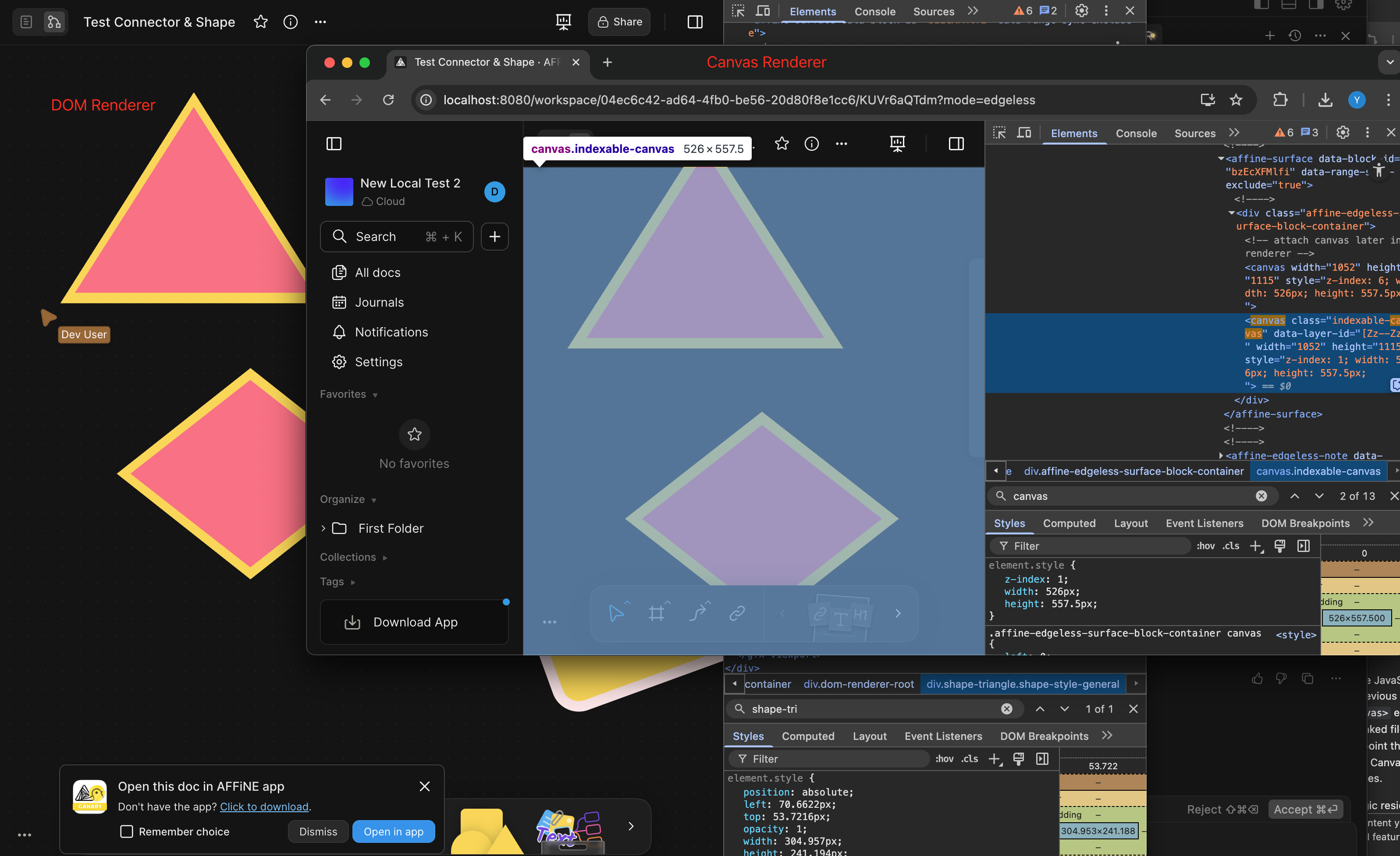
Added DOM-based renderer for connector elements in the AFFiNE editor.

### What changed?

- Created a new DOM-based renderer for connector elements that uses SVG
for rendering
- Implemented `ConnectorDomRendererExtension` to register the DOM
renderer for connector elements
- Added support for rendering connector paths, endpoints (arrows,
triangles, circles, diamonds), stroke styles, and labels
- Registered the new DOM renderer extension in the connector view setup
- Added comprehensive tests to verify DOM rendering functionality

### How to test?

1. Enable the DOM renderer flag in the editor
2. Create connector elements between shapes or with fixed positions
3. Verify that connectors render correctly with different styles:
   - Try different stroke styles (solid, dashed)
   - Test various endpoint styles (Arrow, Triangle, Circle, Diamond)
   - Add text labels to connectors
4. Check that connectors update properly when connected elements move
5. Verify that connectors are removed when deleted

### Why make this change?

The DOM-based renderer provides an alternative to the Canvas-based
renderer, offering better accessibility and potentially improved
performance for certain use cases. This implementation allows connectors
to be rendered as SVG elements within the DOM, which can be more easily
inspected, styled with CSS, and interacted with by assistive
technologies.
<!-- This is an auto-generated comment: release notes by coderabbit.ai -->
## Summary by CodeRabbit
- **New Features**
- Improved rendering for diamond and triangle shapes using SVG, resulting in more accurate stroke and fill display.
- **Bug Fixes**
- Ensured background and border styles do not interfere with SVG-based shapes.
- **Tests**
- Added tests to verify correct DOM rendering for diamond and triangle shapes.
- **Refactor**
- Streamlined and clarified the rendering logic for polygonal shapes, separating SVG and CSS rendering paths.
<!-- end of auto-generated comment: release notes by coderabbit.ai -->
Related to: [BS-3559](https://linear.app/affine-design/issue/BS-3559/ui-%E5%9B%BE%E7%89%87-loading-%E5%8F%98%E9%87%8F%E6%9B%B4%E6%96%B0)

<!-- This is an auto-generated comment: release notes by coderabbit.ai -->
## Summary by CodeRabbit

- **Style**
  - Improved the appearance of image loading indicators by updating background and ring colors for a more consistent visual experience.

- **New Features**
  - Added customization options for the loading icon's ring color.

- **Chores**
  - Updated the "@toeverything/theme" dependency to version ^1.1.15 across multiple packages for improved consistency and compatibility.
<!-- end of auto-generated comment: release notes by coderabbit.ai -->
Close [BS-3305](https://linear.app/affine-design/issue/BS-3305/白板按s应该使用上次的shape形状)

<!-- This is an auto-generated comment: release notes by coderabbit.ai -->
## Summary by CodeRabbit

- **New Features**
  - Added a method to cycle through shape types when using the shape tool.

- **Bug Fixes**
  - Improved shape tool behavior to ensure the selected shape type does not change unexpectedly after adding a new shape.

- **Tests**
  - Added an end-to-end test to verify that the shape tool retains the selected shape type after adding a new shape.
  - Enhanced shortcut tests to verify cycling shapes forward and backward using 's' and 'Shift+s' keys.

- **Refactor**
  - Streamlined the logic for cycling through shape types and connector modes for improved maintainability.
  - Removed external utility for cycling shapes, integrating the functionality directly into the shape tool.
  - Updated keyboard shortcut handling to use the new cycling method within the shape tool.
<!-- end of auto-generated comment: release notes by coderabbit.ai -->
Close [BS-3507](https://linear.app/affine-design/issue/BS-3507/edgeless-text-颜色无法-undoredo)
Close [BS-3426](https://linear.app/affine-design/issue/BS-3426/frame-修改背景色后不能撤销)

This PR fixes the issue where the color change of edgeless blocks could not be undone/redone, including notes, edgeless-text, and frames. It also addresses the problem of a tiny shape being unexpectedly retained on the canvas. The key changes are:
- Removal of `transact` from the `pop` method of edgeless elements.
- Refactoring of `onPickColor` for all edgeless elements and blocks to better control the lifecycle of custom color property changes.
- Addition of the missing custom background color feature for notes.
- Addition of undo/redo color tests for notes, frames, and edgeless-text.

<!-- This is an auto-generated comment: release notes by coderabbit.ai -->
## Summary by CodeRabbit

- **New Features**
  - Added undo and redo support for color changes in frames, notes, and text blocks, allowing users to revert or reapply background and text color modifications.

- **Bug Fixes**
  - Improved reliability of color picker interactions, ensuring consistent state management and transactional updates during color changes.

- **Tests**
  - Introduced new end-to-end tests to verify undo/redo functionality for color changes in frames, notes, and text blocks.

- **Refactor**
  - Streamlined color picker event handling for better maintainability and consistency across toolbars and style panels.
  - Updated style panel structure and event handling for improved interaction and state management.
<!-- end of auto-generated comment: release notes by coderabbit.ai -->
Fixes [BS-3349](https://linear.app/affine-design/issue/BS-3349/)

<!-- This is an auto-generated comment: release notes by coderabbit.ai -->
## Summary by CodeRabbit

- **New Features**
  - Improved edge scrolling during selection dragging for smoother and more responsive viewport navigation.
  - Dragging area and mouse position tracking now update reactively with viewport changes, ensuring more accurate selection and movement.

- **Refactor**
  - Unified and clarified coordinate handling for dragging and mouse position, with clearer naming and separation between model and browser coordinates.
  - Simplified selection logic and removed unnecessary accumulated state for cleaner and more maintainable behavior.
  - Enhanced flexibility in coordinate conversion by allowing viewport transformations relative to arbitrary zoom and center.
  - Streamlined clipboard paste handling by simplifying mouse position extraction and adjusting attachment options.

- **Bug Fixes**
  - Enhanced overlay and dragging area accuracy by updating position calculations and coordinate transformations.
  - Fixed paste operations to correctly handle mouse position without unnecessary coordinate conversions.
  - Corrected drag initiation positions in toolbar and shape dragging to align with viewport-relative coordinates.
<!-- end of auto-generated comment: release notes by coderabbit.ai -->
<!-- This is an auto-generated comment: release notes by coderabbit.ai -->
## Summary by CodeRabbit

- **Chores**
  - Removed multiple internal export entries related to effects modules across various packages.
  - Updated dependencies and configuration references to improve internal consistency. No visible changes for end-users.
<!-- end of auto-generated comment: release notes by coderabbit.ai -->
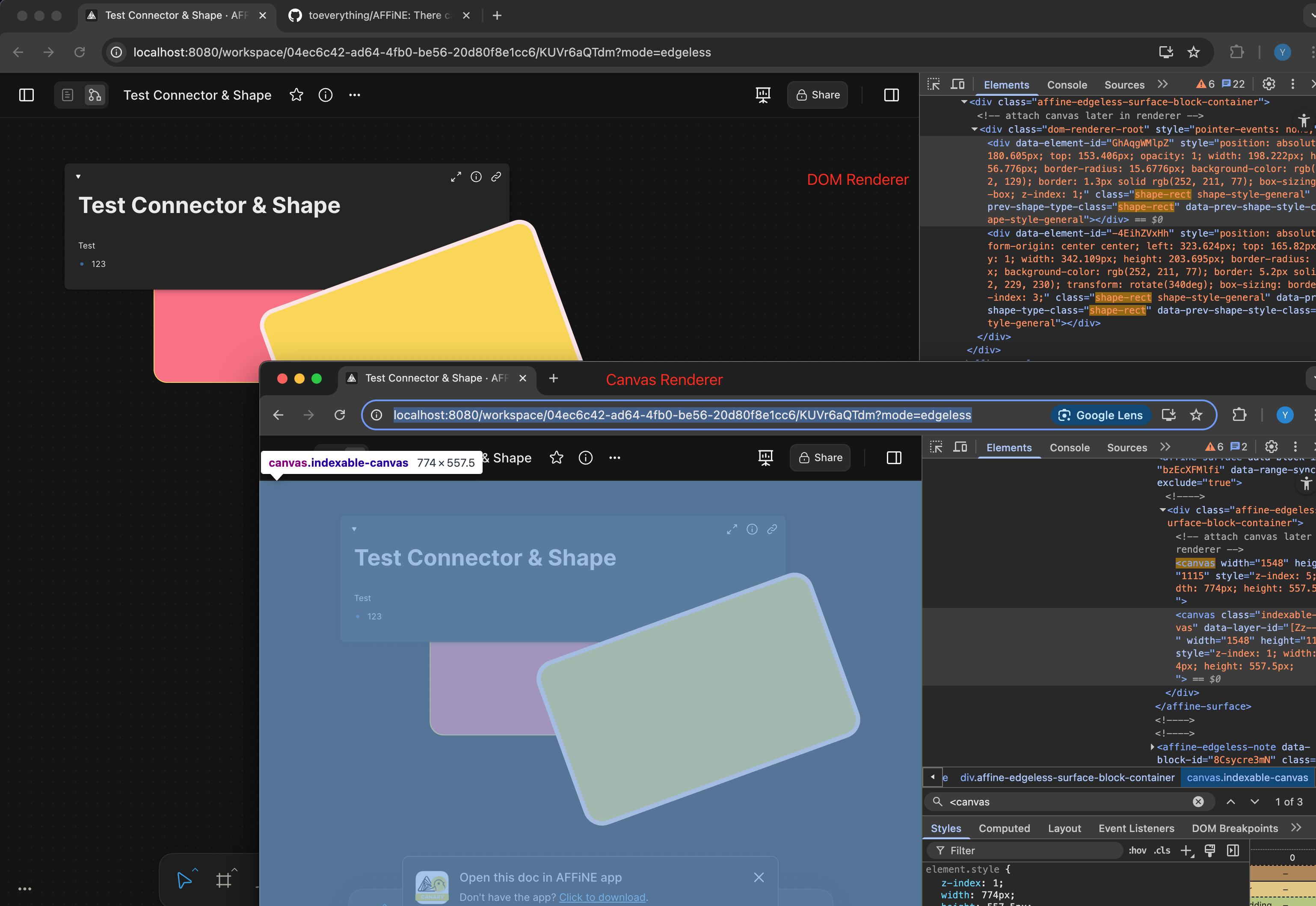
Comparison:
<!-- This is an auto-generated comment: release notes by coderabbit.ai -->
## Summary by CodeRabbit
- **New Features**
- Border radius and border thickness of shapes now scale dynamically with zoom level for improved visual consistency.
- **Tests**
- Added a test to ensure percentage-based border radius values are correctly rendered in the DOM.
<!-- end of auto-generated comment: release notes by coderabbit.ai -->
Closes: BS-3149

<!-- This is an auto-generated comment: release notes by coderabbit.ai -->

## Summary by CodeRabbit

- **Refactor**
  - Improved internal handling of surface components across various tools, resulting in safer and more consistent access patterns.
  - Enhanced code maintainability and reliability without altering any visible features or user workflows.

<!-- end of auto-generated comment: release notes by coderabbit.ai -->
### Changed

This pr split the old `edgeless-selected-rect` into four focused modules:

- `edgeless-selected-rect`: Provide an entry point for user operation on view layer only, no further logic here.

- `GfxViewInteractionExtension`: Allow you to plug in custom resize/rotate behaviors for block or canvas element. If you don’t register an extension, it falls back to the default behaviours.

- `InteractivityManager`: Provide the API that accepts resize/rotate requests, invokes any custom behaviors you’ve registered, tracks the lifecycle and intermediate state, then hands off to the math engine.

- `ResizeController`: A pure math engine that listens for pointer moves and pointer ups and calculates new sizes, positions, and angles. It doesn’t call any business APIs.

### Customizing an element’s resize/rotate behavior
Call `GfxViewInteractionExtension` with the element’s flavour or type plus a config object. In the config you can define:

- `resizeConstraint` (min/max width & height, lock ratio)
- `handleResize(context)` method that returns an object containing `beforeResize`、`onResizeStart`、`onResizeMove`、`onResizeEnd`
- `handleRotate(context)` method that returns an object containing `beforeRotate`、`onRotateStart`、`onRotateMove`、`onRotateEnd`

```typescript
import { GfxViewInteractionExtension } from '@blocksuite/std/gfx';

GfxViewInteractionExtension(
  flavourOrElementType,
  {
    resizeConstraint: {
      minWidth,
      maxWidth,
      lockRatio,
      minHeight,
      maxHeight
    },
    handleResize(context) {
      return {
        beforeResize(context) {},
        onResizeStart(context) {},
        onResizeMove(context) {},
        onResizeEnd(context) {}
      };
    },
    handleRotate(context) {
      return {
        beforeRotate(context) {},
        onRotateStart(context) {},
        onRotateMove(context) {},
        onRotateEnd(context) {}
      };
    }
  }
);
```

<!-- This is an auto-generated comment: release notes by coderabbit.ai -->
## Summary by CodeRabbit

- **New Features**
  - Added interaction extensions for edgeless variants of attachment, bookmark, edgeless text, embedded docs, images, notes, frames, AI chat blocks, and various embed blocks (Figma, GitHub, HTML, iframe, Loom, YouTube).
  - Introduced interaction extensions for graphical elements including connectors, groups, mind maps, shapes, and text, supporting constrained resizing and rotation disabling where applicable.
  - Implemented a unified interaction extension framework enabling configurable resize and rotate lifecycle handlers.
  - Enhanced autocomplete overlay behavior based on selection context.

- **Refactor**
  - Removed legacy resize manager and element-specific resize/rotate logic, replacing with a centralized, extensible interaction system.
  - Simplified resize handle rendering to a data-driven approach with improved cursor management.
  - Replaced complex cursor rotation calculations with fixed-angle mappings for resize handles.
  - Streamlined selection rectangle component to use interactivity services for resize and rotate handling.

- **Bug Fixes**
  - Fixed connector update triggers to reduce unnecessary updates.
  - Improved resize constraints enforcement and interaction state tracking.

- **Tests**
  - Refined end-to-end tests to use higher-level resize utilities and added finer-grained assertions on element dimensions.
  - Enhanced mouse movement granularity in drag tests for better simulation fidelity.

- **Chores**
  - Added new workspace dependencies and project references for the interaction framework modules.
  - Extended public API exports to include new interaction types and extensions.
<!-- end of auto-generated comment: release notes by coderabbit.ai -->
<!-- This is an auto-generated comment: release notes by coderabbit.ai -->

## Summary by CodeRabbit

- **Refactor**
  - Unified internal data access by replacing all references from `doc` to `store` across all components, blocks, widgets, and utilities. This affects how readonly state, block operations, and service retrieval are handled throughout the application.
- **Tests**
  - Updated all test utilities and test cases to use `store` instead of `doc` for document-related operations.
- **Chores**
  - Updated context providers and property names to reflect the change from `doc` to `store` for improved consistency and maintainability.

No user-facing features or behaviors have changed.

<!-- end of auto-generated comment: release notes by coderabbit.ai -->
Close [BS-3268](https://linear.app/affine-design/issue/BS-3268/edgeless-下,-dark-mode-embed的配色应该更加清晰)
Close [BS-3067](https://linear.app/affine-design/issue/BS-3067/在embed上,添加split-view等相关的操作入口,基本接近page-block(见设计稿))

<!-- This is an auto-generated comment: release notes by coderabbit.ai -->
## Summary by CodeRabbit

- **New Features**
  - Introduced an interactive header for embedded synced documents with fold/unfold toggle, document opening, and multiple view options.
  - Added info and copy link buttons for embedded synced documents and notes to improve document management and sharing.
- **Enhancements**
  - Updated styles for embedded synced document blocks and headers for better visual consistency.
  - Added new localization entries for header actions: "Fold", "Unfold", and "Open".
  - Disabled redundant open document actions in toolbars, centralizing controls in the header.
- **Refactor**
  - Unified header button components for notes and embedded synced documents into reusable components.
  - Simplified header components by delegating button behaviors to shared components.
- **Bug Fixes**
  - Fixed conditional rendering of editor content in embedded synced documents when folded.
- **Chores**
  - Upgraded theme dependency version from "^1.1.12" to "^1.1.14" across multiple packages.
<!-- end of auto-generated comment: release notes by coderabbit.ai -->
Closes: BS-3209

<!-- This is an auto-generated comment: release notes by coderabbit.ai -->

## Summary by CodeRabbit

- **New Features**
  - Introduced mind map view and store extensions, enhancing mind map integration and conversion to plain text and markdown formats.
  - Added priority property to quick tools, allowing for custom ordering in the toolbar.
- **Improvements**
  - Toolbar quick tools are now sorted by priority for a more intuitive user experience.
  - Updated toolbar and extension configurations to streamline available tools and extensions.
- **Bug Fixes**
  - Conditional registration of certain components ensures correct behavior in edgeless mode.
- **Chores**
  - Updated dependencies and project references to improve module integration and maintainability.

<!-- end of auto-generated comment: release notes by coderabbit.ai -->
### Changed
Moved connector label moving logic from `default-tool` to connector view.
#### Other infrastructure changes:
- Gfx element view now can handles drag events
- Added `context.preventDefault()` support to bypass built-in interactions in extension
- Handle the pointer events in element view will bypass the built-in interactions automatically
> The built-in interactions include element dragging, click selection, drag-to-scale operations, etc.
Close [BS-3029](https://linear.app/affine-design/issue/BS-3029/frame-里面的-shape-没办法进入文本编辑模式)
Close [BS-3082](https://linear.app/affine-design/issue/BS-3082/按s切换至shape工具,在白板上点击会创建两个shape)
Close [BS-3091](https://linear.app/affine-design/issue/BS-3082/按s切换至shape工具,在白板上点击会创建两个shape)

## Fix Shape Tool Issues

This PR addresses several issues with the shape and mindmap tools functionality in the editor:

1. **Fix text editing after mode switching**: Resolves an issue where users couldn't edit text in shapes after switching editor modes. The fix ensures the edgeless block is properly retrieved when double-clicking on a shape.

2. **Improve tool switching behavior**: Fixes issues with tool overlays not showing or being repeated when switching between tools. This includes:
   - Properly handling tool overlay visibility
   - Ensuring only one tool is active at a time when using keyboard shortcuts
   - Adding proper cleanup when switching tools

3. **Add comprehensive tests**: Adds new test cases to verify:
   - Shape creation with keyboard shortcuts
   - Shape text editing after mode switching
   - Tool switching behavior with keyboard shortcuts
continue #10824

### Changed
- Moved double-click-to-edit behavior from the default tool to individual model views
- Introduced `onSelected` callback interface in gfx view components to allows developers to override default selection logic
 Yifeng Wang

