fix#14433
#### PR Dependency Tree
* **PR #14442** 👈
This tree was auto-generated by
[Charcoal](https://github.com/danerwilliams/charcoal)
<!-- This is an auto-generated comment: release notes by coderabbit.ai
-->
## Summary by CodeRabbit
* **New Features**
* Level-of-detail thumbnails for large images.
* Adaptive pacing for snapping, distribution and other alignment work.
* RAF coalescer utility to batch high-frequency updates.
* Operation timing utility to measure synchronous work.
* **Improvements**
* Batch group/ungroup reparenting that preserves element order and
selection.
* Coalesced panning and drag updates to reduce jitter.
* Connector/group indexing for more reliable updates, deletions and
sync.
* Throttled viewport refresh behavior.
* **Documentation**
* Docs added for RAF coalescer and measureOperation.
<!-- end of auto-generated comment: release notes by coderabbit.ai -->
### Problem
●In edgeless mode, the embed-edgeless-doc's content does not match the
size of its outer block when zoom ≠ 1.
●The follwing image and video show the issue at zoom = 0.5.

<img width="610" height="193" alt="图片"
src="https://github.com/user-attachments/assets/c50849c6-d55b-4175-9b70-218f69ab976a"
/>


https://github.com/user-attachments/assets/ea7e7cc4-64ae-4747-8124-16c4eea6458e

### Reason and resolve
●The issue occurs because the surface-block canvas uses the container’s
dimensions obtained from getBoundingClientRect(), which are already
affected by the CSS transform. The canvas is then transformed again
together with the container, causing the size mismatch.
●To keep all drawing operations in the surface-block’s original
coordinate space, we apply a reverse transform to the canvas.

### After


https://github.com/user-attachments/assets/6c802b81-d520-44a0-9f01-78d0d60d37b8


<!-- This is an auto-generated comment: release notes by coderabbit.ai
-->

## Summary by CodeRabbit

* **Bug Fixes**
* Canvas rendering now properly responds to viewport zoom levels. Visual
scaling is applied dynamically to ensure canvases align correctly with
viewport scaling, providing consistent and accurate rendering during
zoomed interactions while preserving original canvas dimensions.

<sub>✏️ Tip: You can customize this high-level summary in your review
settings.</sub>

<!-- end of auto-generated comment: release notes by coderabbit.ai -->
#### PR Dependency Tree


* **PR #13464**
  * **PR #13465**
    * **PR #13471** 👈
      * **PR #13472**
        * **PR #13473**

This tree was auto-generated by
[Charcoal](https://github.com/danerwilliams/charcoal)

<!-- This is an auto-generated comment: release notes by coderabbit.ai
-->
## Summary by CodeRabbit

* **New Features**
* DOM rendering added for groups, mind maps and connectors so group
titles/outlines and mindmap connectors are visible on canvas.
* Shapes now support right-to-left text with proper vertical alignment.
* **Improvements**
  * Connector labels scale with viewport zoom for crisper display.
* Group-related selections (including nested groups) now update visuals
consistently.
* **Performance**
* Reduced DOM churn and fewer redraws during rendering and selection
changes.
* **Refactor**
* Renderer import/export surfaces consolidated with no user-facing
behavior changes.
<!-- end of auto-generated comment: release notes by coderabbit.ai -->
#### PR Dependency Tree


* **PR #13464**
  * **PR #13465** 👈
    * **PR #13471**
      * **PR #13472**
        * **PR #13473**

This tree was auto-generated by
[Charcoal](https://github.com/danerwilliams/charcoal)

<!-- This is an auto-generated comment: release notes by coderabbit.ai
-->

## Summary by CodeRabbit

* **Bug Fixes**
* Improved stacking order across canvas elements (shapes, connectors,
brush, highlighter), reducing unexpected overlap.
* Corrected z-index application for placeholders and fully rendered
elements to ensure consistent layering during edits.
* **Refactor**
* Centralized z-index handling for canvas elements to provide
predictable, uniform layering behavior across the app.

<!-- end of auto-generated comment: release notes by coderabbit.ai -->
Before (brush updated even when it's not being dragged):

https://github.com/user-attachments/assets/e56ce326-56ae-4cac-a5f8-86be35fd8fcd

After (fine-grained element level update):

https://github.com/user-attachments/assets/712f4e22-0830-455d-bbe1-0f575e8920ac

<!-- This is an auto-generated comment: release notes by coderabbit.ai -->
## Summary by CodeRabbit

- **New Features**
  - Improved rendering performance by introducing incremental updates, ensuring only changed elements are updated instead of re-rendering everything.
  - Enhanced responsiveness when elements are added, removed, or updated, as well as during viewport, size, or zoom changes.

- **Bug Fixes**
  - Reduced unnecessary full re-renders, leading to smoother and more efficient user interactions.
<!-- end of auto-generated comment: release notes by coderabbit.ai -->
### Changed

- Note scale issue
- Overlay should call refresh when `clear` is called
- Optimize edgeless-selected-rect to avoid unecessary rerendering

<!-- This is an auto-generated comment: release notes by coderabbit.ai -->
## Summary by CodeRabbit

- **New Features**
  - Edgeless note blocks now respect both minimum and maximum size limits when resizing.

- **Improvements**
  - Enhanced performance and responsiveness of resize and rotate handles in selection overlays by caching allowed handles and optimizing cursor management.
  - Cursor styles for resize and rotate handles are now set more reliably and efficiently through declarative styling.

- **Bug Fixes**
  - Ensured overlay clearing now properly refreshes the renderer for more consistent visual updates.
<!-- end of auto-generated comment: release notes by coderabbit.ai -->
Fixes [BS-3528](https://linear.app/affine-design/issue/BS-3528)
Fixes [BS-3331](https://linear.app/affine-design/issue/BS-3331/frame-移动逻辑很奇怪)

### Changed
- Remove `onSelected` method from gfx view, use `handleSelection` provided by `GfxViewInteraction` instead.
- Add `selectable` to allow model to filter out itself from selection.
- Frame can be selected by body only if it's locked or its background is not transparent.

<!-- This is an auto-generated comment: release notes by coderabbit.ai -->
## Summary by CodeRabbit

- **New Features**
  - Enhanced selection behavior for frames, edgeless text, notes, and mind map elements with refined control based on lock state and background transparency.
  - Introduced group-aware selection logic promoting selection of appropriate group ancestors.
  - Added support for element selection events in interactivity extensions.

- **Bug Fixes**
  - Resolved frame selection issues by enabling selection via title clicks and restricting body selection to locked frames or those with non-transparent backgrounds.

- **Documentation**
  - Added clarifying comments for group retrieval methods.

- **Tests**
  - Updated and added end-to-end tests for frame and lock selection reflecting new selection conditions.

- **Refactor**
  - Unified and simplified selection handling by moving logic from component methods to interaction handlers and removing deprecated selection methods.
  - Streamlined selection candidate processing with extension-driven target suggestion.
  - Removed legacy group element retrieval and selection helper methods to simplify interaction logic.

- **Style**
  - Renamed types and improved type signatures for selection context and interaction configurations.
<!-- end of auto-generated comment: release notes by coderabbit.ai -->
Fixes [BS-3349](https://linear.app/affine-design/issue/BS-3349/)

<!-- This is an auto-generated comment: release notes by coderabbit.ai -->
## Summary by CodeRabbit

- **New Features**
  - Improved edge scrolling during selection dragging for smoother and more responsive viewport navigation.
  - Dragging area and mouse position tracking now update reactively with viewport changes, ensuring more accurate selection and movement.

- **Refactor**
  - Unified and clarified coordinate handling for dragging and mouse position, with clearer naming and separation between model and browser coordinates.
  - Simplified selection logic and removed unnecessary accumulated state for cleaner and more maintainable behavior.
  - Enhanced flexibility in coordinate conversion by allowing viewport transformations relative to arbitrary zoom and center.
  - Streamlined clipboard paste handling by simplifying mouse position extraction and adjusting attachment options.

- **Bug Fixes**
  - Enhanced overlay and dragging area accuracy by updating position calculations and coordinate transformations.
  - Fixed paste operations to correctly handle mouse position without unnecessary coordinate conversions.
  - Corrected drag initiation positions in toolbar and shape dragging to align with viewport-relative coordinates.
<!-- end of auto-generated comment: release notes by coderabbit.ai -->
<!-- This is an auto-generated comment: release notes by coderabbit.ai -->
## Summary by CodeRabbit

- **Refactor**
  - Streamlined and consolidated block and inline extension exports by removing multiple block-spec and inline extension arrays from public APIs.
  - Reduced exported constants, types, and utility functions related to various block and embed features.
  - Simplified the codebase by removing deprecated type guards, adapter extensions, and redundant extension groupings.
- **Chores**
  - Cleaned up internal APIs by deleting unused exports, imports, and outdated code, enhancing maintainability.
<!-- end of auto-generated comment: release notes by coderabbit.ai -->
<!-- This is an auto-generated comment: release notes by coderabbit.ai -->

## Summary by CodeRabbit

- **Refactor**
  - Unified internal data access by replacing all references from `doc` to `store` across all components, blocks, widgets, and utilities. This affects how readonly state, block operations, and service retrieval are handled throughout the application.
- **Tests**
  - Updated all test utilities and test cases to use `store` instead of `doc` for document-related operations.
- **Chores**
  - Updated context providers and property names to reflect the change from `doc` to `store` for improved consistency and maintainability.

No user-facing features or behaviors have changed.

<!-- end of auto-generated comment: release notes by coderabbit.ai -->
### TL;DR
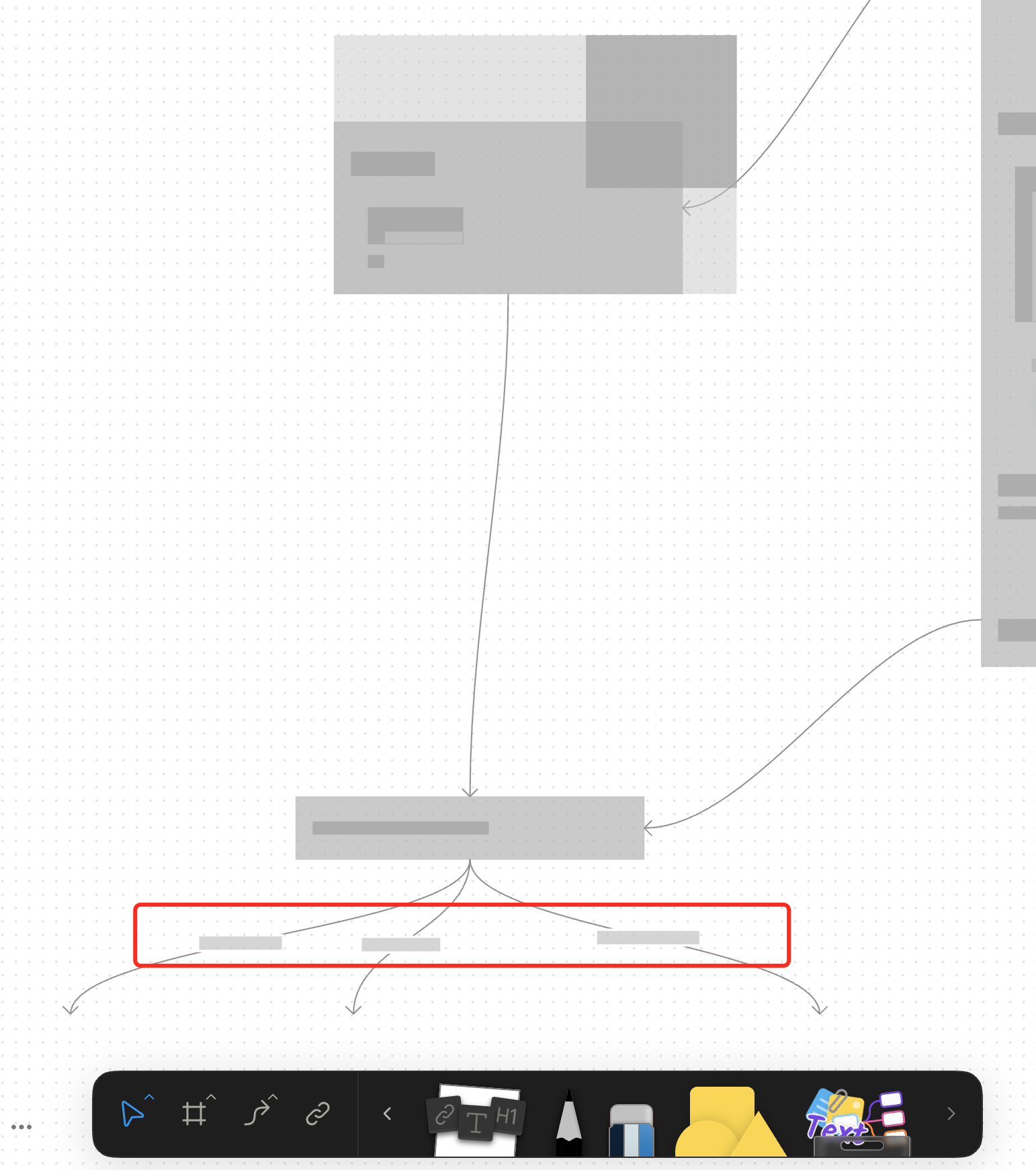
For canvas elements, this PR adds placeholders during zooming operations to improve performance.
### What changed?
- Implemented placeholder rendering during zooming operations in the canvas renderer, but not only DOM.
- Added a `forceFullRender` property to the `GfxCompatibleInterface` to allow elements to opt out of placeholder rendering
- Set `forceFullRender = true` for connectors to ensure they always render properly, even during zooming
- Connected the turbo renderer to the viewport's zooming state to automatically switch between full and placeholder rendering
### Why make this change?
Rendering complex elements during zooming operations can cause performance issues and make the UI feel sluggish. Rendering connector label also leads to high cost DOM `set font` delays.
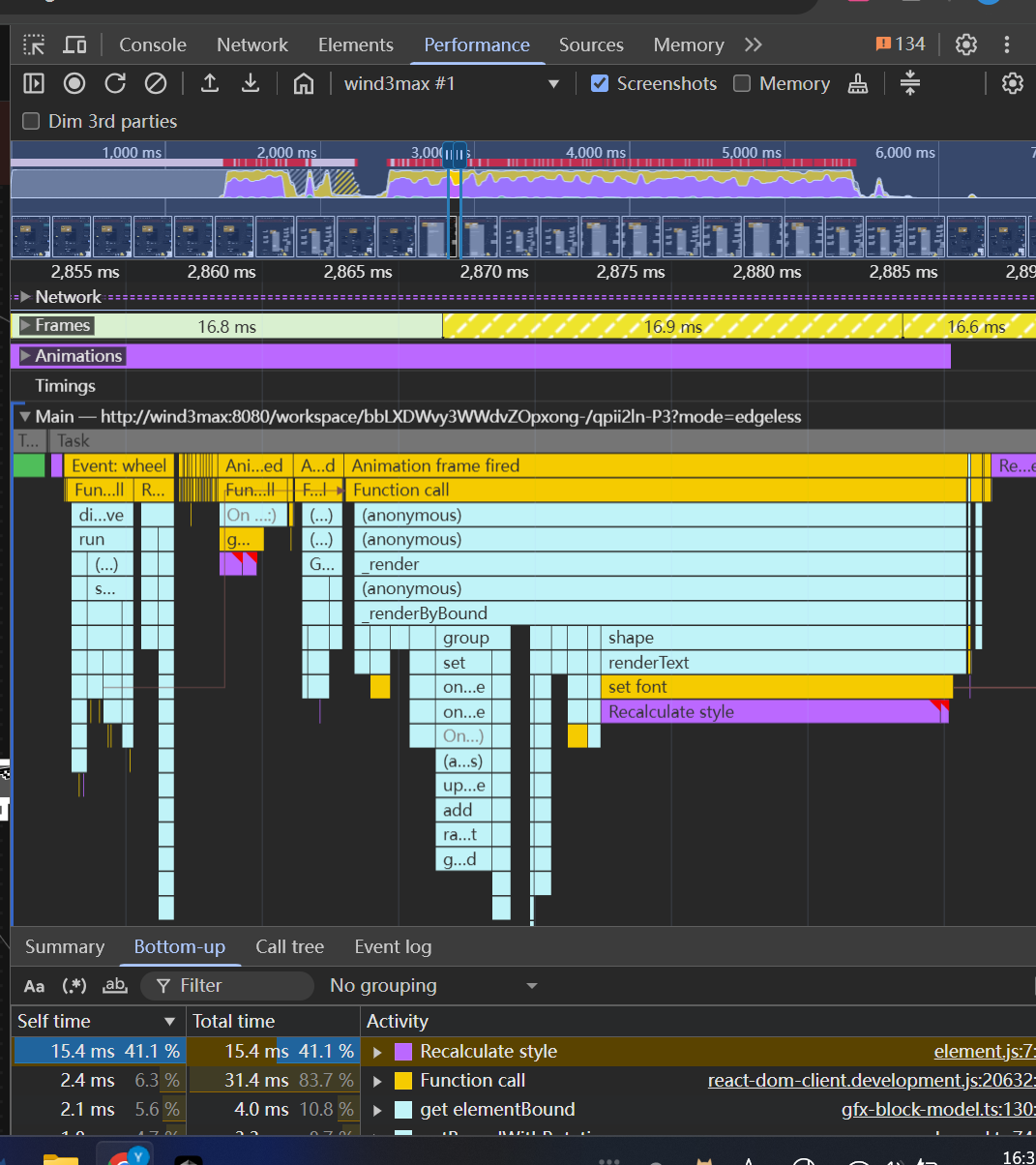
The turbo renderer improves performance by displaying simple placeholders for elements during zooming, while still rendering critical elements like connectors fully. This creates a smoother user experience while maintaining essential visual information.
<!-- This is an auto-generated comment: release notes by coderabbit.ai -->
## Summary by CodeRabbit
- **New Features**
- Introduced a feature-flag-controlled "turbo" rendering mode that displays placeholder graphics during zooming for improved performance.
- Added the ability to override placeholder rendering for specific elements, ensuring full rendering when required.
- **Bug Fixes**
- Enhanced rendering logic to ensure connectors always render fully, even during zoom operations.
- **Documentation**
- Updated API documentation to reflect new properties related to rendering behavior.
- **Tests**
- Improved tests to verify correct rendering behavior for connectors.
<!-- end of auto-generated comment: release notes by coderabbit.ai -->
<!-- This is an auto-generated comment: release notes by coderabbit.ai -->
## Summary by CodeRabbit

- **New Features**
  - Introduced a new pointer graphics module with tools and quick tool integration for edgeless surfaces.
  - Added a quick tool button for pointer interactions in edgeless mode.
  - Exposed new extension points for pointer graphics and effects.

- **Improvements**
  - Integrated pointer graphics as a dependency into related packages.
  - Enhanced toolbar context to support additional surface alignment modes.
  - Added conditional clipboard configuration registrations for edgeless contexts across multiple block types.

- **Removals**
  - Removed legacy tool and effect definitions and related quick tool exports from edgeless components.
  - Streamlined extension arrays and removed unused exports for a cleaner codebase.
  - Deleted obsolete utility functions and component registrations.

- **Chores**
  - Updated workspace and TypeScript project references to include the new pointer graphics module.
<!-- end of auto-generated comment: release notes by coderabbit.ai -->
Closes: BS-3208

<!-- This is an auto-generated comment: release notes by coderabbit.ai -->

## Summary by CodeRabbit

- **New Features**
  - Introduced a new group view extension, enhancing how group elements are handled and displayed.
  - Added new store and view modules for group-related features, improving modularity and integration.

- **Refactor**
  - Updated the group element architecture to use extension-based registration for views, toolbars, and effects.
  - Simplified and reorganized exports for group and text modules.

- **Chores**
  - Updated dependencies and project references to improve build consistency and compatibility.

<!-- end of auto-generated comment: release notes by coderabbit.ai -->
Close [BS-3029](https://linear.app/affine-design/issue/BS-3029/frame-里面的-shape-没办法进入文本编辑模式)
Close [BS-3082](https://linear.app/affine-design/issue/BS-3082/按s切换至shape工具,在白板上点击会创建两个shape)
Close [BS-3091](https://linear.app/affine-design/issue/BS-3082/按s切换至shape工具,在白板上点击会创建两个shape)

## Fix Shape Tool Issues

This PR addresses several issues with the shape and mindmap tools functionality in the editor:

1. **Fix text editing after mode switching**: Resolves an issue where users couldn't edit text in shapes after switching editor modes. The fix ensures the edgeless block is properly retrieved when double-clicking on a shape.

2. **Improve tool switching behavior**: Fixes issues with tool overlays not showing or being repeated when switching between tools. This includes:
   - Properly handling tool overlay visibility
   - Ensuring only one tool is active at a time when using keyboard shortcuts
   - Adding proper cleanup when switching tools

3. **Add comprehensive tests**: Adds new test cases to verify:
   - Shape creation with keyboard shortcuts
   - Shape text editing after mode switching
   - Tool switching behavior with keyboard shortcuts


