#### PR Dependency Tree


* **PR #12948** 👈
  * **PR #12980**

This tree was auto-generated by
[Charcoal](https://github.com/danerwilliams/charcoal)

<!-- This is an auto-generated comment: release notes by coderabbit.ai
-->

## Summary by CodeRabbit

* **New Features**
* Introduced inline comment functionality, allowing users to add,
resolve, and highlight comments directly within text.
  * Added a new toolbar action for inserting comments when supported.
* Inline comments are visually highlighted and can be interacted with in
the editor.

* **Enhancements**
  * Integrated a feature flag to enable or disable the comment feature.
* Improved inline manager rendering to support wrapper specs for
advanced formatting.

* **Developer Tools**
* Added mock comment provider for testing and development environments.

* **Chores**
* Updated dependencies and project references to support the new inline
comment module.

<!-- end of auto-generated comment: release notes by coderabbit.ai -->
Fix#12284
Close
[BS-3517](https://linear.app/affine-design/issue/BS-3517/微软新注音输入法无法使用markdown语法)
This PR refactor the markdown transform during inputting, including:
- Transfrom markdown syntax input in `inlineEditor.slots.inputting`,
where we can detect the space character inputed by IME like Microsoft
Bopomofo, but `keydown` event can't.
- Remove `markdown-input.ts` which was used in `KeymapExtension` of
paragraph, and refactor with `InlineMarkdownExtension`
- Adjust existing `InlineMarkdownExtension` since the space is included
in text.
- Add two `InlineMarkdownExtension` for paragraph and list to impl
Heading1-6, number, bullet, to-do list conversion.
Other changes:
- Improve type hint for parameter of `store.addBlock`
<!-- This is an auto-generated comment: release notes by coderabbit.ai
-->
## Summary by CodeRabbit
## Summary by CodeRabbit
- **New Features**
- Added markdown shortcuts for creating code blocks and dividers in the
rich text editor.
- Introduced enhanced paragraph markdown support for headings and
blockquotes with inline markdown patterns.
- Integrated new list markdown extension supporting numbered, bulleted,
and todo lists with checked states.
- **Improvements**
- Updated markdown formatting patterns to require trailing spaces for
links, LaTeX, and inline styles, improving detection accuracy.
- Markdown transformations now respond to input events instead of
keydown for smoother editing experience.
- Added focus management after markdown transformations to maintain
seamless editing flow.
- **Bug Fixes**
- Removed unnecessary prevention of default behavior on space and
shift-space key presses in list and paragraph editors.
- **Refactor**
- Enhanced event handling and typing for editor input events, improving
reliability and maintainability.
- Refined internal prefix text extraction logic for markdown processing.
<!-- end of auto-generated comment: release notes by coderabbit.ai -->
Closes: [BS-3586](https://linear.app/affine-design/issue/BS-3586/复制白板图片,然后粘贴到-page,图片失败)

<!-- This is an auto-generated comment: release notes by coderabbit.ai -->
## Summary by CodeRabbit

- **New Features**
  - Copying a single selected image in edgeless mode now places the image directly onto the system clipboard as a native image blob for smoother pasting.

- **Bug Fixes**
  - Enhanced clipboard handling to better manage image and text data inclusion, with improved fallback for snapshot HTML.

- **Tests**
  - Added an end-to-end test verifying image copy-paste functionality between edgeless and page editor modes.
<!-- end of auto-generated comment: release notes by coderabbit.ai -->
<!-- This is an auto-generated comment: release notes by coderabbit.ai -->

## Summary by CodeRabbit

- **New Features**
  - The application now automatically becomes inactive when the document is hidden, improving resource management and responsiveness to visibility changes.

<!-- end of auto-generated comment: release notes by coderabbit.ai -->
### Changed
- Better snapping when resize elements

<!-- This is an auto-generated comment: release notes by coderabbit.ai -->
## Summary by CodeRabbit

- **New Features**
  - Improved resizing behavior with enhanced alignment and snapping during element resizing, supporting rotation and multiple element selection.
  - Alignment lines now display more accurately when resizing elements.

- **Refactor**
  - Resizing logic updated to use scale factors instead of position deltas, enabling smoother and more precise resize operations.
  - Resize event data now includes richer details about handle positions, scaling, and original bounds.
  - Coordinate transformations and scaling now account for rotation and aspect ratio locking more robustly.
  - Cursor updates are disabled during active resize or rotate interactions for a smoother user experience.

- **Tests**
  - Updated resizing tests to use square shapes, ensuring consistent verification of aspect ratio maintenance.
<!-- end of auto-generated comment: release notes by coderabbit.ai -->
This PR fixed that the block is missing in the selecte-all set after undo a dragging from canvas to note. Related to #12473

### Before

https://github.com/user-attachments/assets/828b4f48-689a-4975-bba6-f380f324de3c

### After

https://github.com/user-attachments/assets/9996c1ca-c3ea-415c-ab2b-359d826a1ffa

<!-- This is an auto-generated comment: release notes by coderabbit.ai -->
## Summary by CodeRabbit

- **Bug Fixes**
  - Improved handling of changes to child elements, ensuring more accurate updates when items are added or removed. This results in more reliable display and interaction with nested components.
<!-- end of auto-generated comment: release notes by coderabbit.ai -->
Fixes [BS-2753](https://linear.app/affine-design/issue/BS-2753/)

<!-- This is an auto-generated comment: release notes by coderabbit.ai -->
## Summary by CodeRabbit

- **New Features**
  - Added snapping support when resizing elements, improving alignment and precision during resize operations.
  - Introduced new resize event handlers allowing extensions to customize resize behavior with start, move, and end callbacks.

- **Bug Fixes**
  - Improved handling of snapping state to prevent errors during drag and resize actions.

- **Tests**
  - Updated resizing tests to ensure consistent snapping behavior by removing default elements that could interfere with test results.
<!-- end of auto-generated comment: release notes by coderabbit.ai -->
Closes: BS-2290

<!-- This is an auto-generated comment: release notes by coderabbit.ai -->
## Summary by CodeRabbit

## Summary by CodeRabbit

- **Bug Fixes**
  - Improved focus behavior when switching between tabs to prevent unwanted automatic focusing of the content-editable area.
  - Enhanced selection clearing to avoid unnecessary blurring when the main editable element is already focused.
  - Refined focus checks in tests to specifically target contenteditable elements, ensuring more accurate validation of focus behavior.
  - Adjusted test assertions for block selection to be less strict and removed redundant blur operations for smoother test execution.
  - Updated toolbar dropdown closing method to use keyboard interaction for better reliability.
- **New Features**
  - Added a recoverable property to selection types, improving selection state management and recovery.
<!-- end of auto-generated comment: release notes by coderabbit.ai -->
Fixes [BS-3528](https://linear.app/affine-design/issue/BS-3528)
Fixes [BS-3331](https://linear.app/affine-design/issue/BS-3331/frame-移动逻辑很奇怪)

### Changed
- Remove `onSelected` method from gfx view, use `handleSelection` provided by `GfxViewInteraction` instead.
- Add `selectable` to allow model to filter out itself from selection.
- Frame can be selected by body only if it's locked or its background is not transparent.

<!-- This is an auto-generated comment: release notes by coderabbit.ai -->
## Summary by CodeRabbit

- **New Features**
  - Enhanced selection behavior for frames, edgeless text, notes, and mind map elements with refined control based on lock state and background transparency.
  - Introduced group-aware selection logic promoting selection of appropriate group ancestors.
  - Added support for element selection events in interactivity extensions.

- **Bug Fixes**
  - Resolved frame selection issues by enabling selection via title clicks and restricting body selection to locked frames or those with non-transparent backgrounds.

- **Documentation**
  - Added clarifying comments for group retrieval methods.

- **Tests**
  - Updated and added end-to-end tests for frame and lock selection reflecting new selection conditions.

- **Refactor**
  - Unified and simplified selection handling by moving logic from component methods to interaction handlers and removing deprecated selection methods.
  - Streamlined selection candidate processing with extension-driven target suggestion.
  - Removed legacy group element retrieval and selection helper methods to simplify interaction logic.

- **Style**
  - Renamed types and improved type signatures for selection context and interaction configurations.
<!-- end of auto-generated comment: release notes by coderabbit.ai -->
Close [BS-3507](https://linear.app/affine-design/issue/BS-3507/edgeless-text-颜色无法-undoredo)
Close [BS-3426](https://linear.app/affine-design/issue/BS-3426/frame-修改背景色后不能撤销)

This PR fixes the issue where the color change of edgeless blocks could not be undone/redone, including notes, edgeless-text, and frames. It also addresses the problem of a tiny shape being unexpectedly retained on the canvas. The key changes are:
- Removal of `transact` from the `pop` method of edgeless elements.
- Refactoring of `onPickColor` for all edgeless elements and blocks to better control the lifecycle of custom color property changes.
- Addition of the missing custom background color feature for notes.
- Addition of undo/redo color tests for notes, frames, and edgeless-text.

<!-- This is an auto-generated comment: release notes by coderabbit.ai -->
## Summary by CodeRabbit

- **New Features**
  - Added undo and redo support for color changes in frames, notes, and text blocks, allowing users to revert or reapply background and text color modifications.

- **Bug Fixes**
  - Improved reliability of color picker interactions, ensuring consistent state management and transactional updates during color changes.

- **Tests**
  - Introduced new end-to-end tests to verify undo/redo functionality for color changes in frames, notes, and text blocks.

- **Refactor**
  - Streamlined color picker event handling for better maintainability and consistency across toolbars and style panels.
  - Updated style panel structure and event handling for improved interaction and state management.
<!-- end of auto-generated comment: release notes by coderabbit.ai -->
Fixes [BS-3349](https://linear.app/affine-design/issue/BS-3349/)

<!-- This is an auto-generated comment: release notes by coderabbit.ai -->
## Summary by CodeRabbit

- **New Features**
  - Improved edge scrolling during selection dragging for smoother and more responsive viewport navigation.
  - Dragging area and mouse position tracking now update reactively with viewport changes, ensuring more accurate selection and movement.

- **Refactor**
  - Unified and clarified coordinate handling for dragging and mouse position, with clearer naming and separation between model and browser coordinates.
  - Simplified selection logic and removed unnecessary accumulated state for cleaner and more maintainable behavior.
  - Enhanced flexibility in coordinate conversion by allowing viewport transformations relative to arbitrary zoom and center.
  - Streamlined clipboard paste handling by simplifying mouse position extraction and adjusting attachment options.

- **Bug Fixes**
  - Enhanced overlay and dragging area accuracy by updating position calculations and coordinate transformations.
  - Fixed paste operations to correctly handle mouse position without unnecessary coordinate conversions.
  - Corrected drag initiation positions in toolbar and shape dragging to align with viewport-relative coordinates.
<!-- end of auto-generated comment: release notes by coderabbit.ai -->
Fixes [BS-3373](https://linear.app/affine-design/issue/BS-3373/connector%E7%9A%84%E5%8F%8C%E5%87%BB%E6%B7%BB%E5%8A%A0note%E8%A1%8C%E4%B8%BA%E5%8F%97%E5%88%B0%E4%BA%86%E8%A6%86%E7%9B%96%E8%8C%83%E5%9B%B4%E7%9A%84%E5%BD%B1%E5%93%8D)

<!-- This is an auto-generated comment: release notes by coderabbit.ai -->
## Summary by CodeRabbit

- **New Features**
  - Connector label elements now include identity and creator metadata.

- **Bug Fixes**
  - Improved hit-testing for pointer interactions, resulting in more accurate detection of hovered elements.

- **Refactor**
  - Enhanced internal comparison logic for elements, improving sorting and ordering consistency.
  - Strengthened type definitions for search filters, improving result accuracy and clarity.

- **Tests**
  - Added end-to-end tests to verify correct label entry and retrieval for multiple connectors.
  - Introduced utility functions to fetch connector labels and improved connector creation in test actions.
<!-- end of auto-generated comment: release notes by coderabbit.ai -->
### Changed

This pr split the old `edgeless-selected-rect` into four focused modules:

- `edgeless-selected-rect`: Provide an entry point for user operation on view layer only, no further logic here.

- `GfxViewInteractionExtension`: Allow you to plug in custom resize/rotate behaviors for block or canvas element. If you don’t register an extension, it falls back to the default behaviours.

- `InteractivityManager`: Provide the API that accepts resize/rotate requests, invokes any custom behaviors you’ve registered, tracks the lifecycle and intermediate state, then hands off to the math engine.

- `ResizeController`: A pure math engine that listens for pointer moves and pointer ups and calculates new sizes, positions, and angles. It doesn’t call any business APIs.

### Customizing an element’s resize/rotate behavior
Call `GfxViewInteractionExtension` with the element’s flavour or type plus a config object. In the config you can define:

- `resizeConstraint` (min/max width & height, lock ratio)
- `handleResize(context)` method that returns an object containing `beforeResize`、`onResizeStart`、`onResizeMove`、`onResizeEnd`
- `handleRotate(context)` method that returns an object containing `beforeRotate`、`onRotateStart`、`onRotateMove`、`onRotateEnd`

```typescript
import { GfxViewInteractionExtension } from '@blocksuite/std/gfx';

GfxViewInteractionExtension(
  flavourOrElementType,
  {
    resizeConstraint: {
      minWidth,
      maxWidth,
      lockRatio,
      minHeight,
      maxHeight
    },
    handleResize(context) {
      return {
        beforeResize(context) {},
        onResizeStart(context) {},
        onResizeMove(context) {},
        onResizeEnd(context) {}
      };
    },
    handleRotate(context) {
      return {
        beforeRotate(context) {},
        onRotateStart(context) {},
        onRotateMove(context) {},
        onRotateEnd(context) {}
      };
    }
  }
);
```

<!-- This is an auto-generated comment: release notes by coderabbit.ai -->
## Summary by CodeRabbit

- **New Features**
  - Added interaction extensions for edgeless variants of attachment, bookmark, edgeless text, embedded docs, images, notes, frames, AI chat blocks, and various embed blocks (Figma, GitHub, HTML, iframe, Loom, YouTube).
  - Introduced interaction extensions for graphical elements including connectors, groups, mind maps, shapes, and text, supporting constrained resizing and rotation disabling where applicable.
  - Implemented a unified interaction extension framework enabling configurable resize and rotate lifecycle handlers.
  - Enhanced autocomplete overlay behavior based on selection context.

- **Refactor**
  - Removed legacy resize manager and element-specific resize/rotate logic, replacing with a centralized, extensible interaction system.
  - Simplified resize handle rendering to a data-driven approach with improved cursor management.
  - Replaced complex cursor rotation calculations with fixed-angle mappings for resize handles.
  - Streamlined selection rectangle component to use interactivity services for resize and rotate handling.

- **Bug Fixes**
  - Fixed connector update triggers to reduce unnecessary updates.
  - Improved resize constraints enforcement and interaction state tracking.

- **Tests**
  - Refined end-to-end tests to use higher-level resize utilities and added finer-grained assertions on element dimensions.
  - Enhanced mouse movement granularity in drag tests for better simulation fidelity.

- **Chores**
  - Added new workspace dependencies and project references for the interaction framework modules.
  - Extended public API exports to include new interaction types and extensions.
<!-- end of auto-generated comment: release notes by coderabbit.ai -->
<!-- This is an auto-generated comment: release notes by coderabbit.ai -->
## Summary by CodeRabbit

- **New Features**
  - Introduced a new slider component for line width selection, providing a more interactive and streamlined UI.
  - Added support for using the slider component across relevant panels.
- **Improvements**
  - Simplified the line width selection panel for easier use and improved maintainability.
  - Enhanced event handling to prevent dropdowns from closing when interacting with the panel.
- **Bug Fixes**
  - Improved event propagation control within the line styles panel.
- **Chores**
  - Updated package exports to include the new slider component.
<!-- end of auto-generated comment: release notes by coderabbit.ai -->
<!-- This is an auto-generated comment: release notes by coderabbit.ai -->

## Summary by CodeRabbit

- **Refactor**
  - Unified internal data access by replacing all references from `doc` to `store` across all components, blocks, widgets, and utilities. This affects how readonly state, block operations, and service retrieval are handled throughout the application.
- **Tests**
  - Updated all test utilities and test cases to use `store` instead of `doc` for document-related operations.
- **Chores**
  - Updated context providers and property names to reflect the change from `doc` to `store` for improved consistency and maintainability.

No user-facing features or behaviors have changed.

<!-- end of auto-generated comment: release notes by coderabbit.ai -->
This PR make out-of-viewport but selected edgeless block keep active, since the selected block may still have some user interactions on the DOM. For example, when hover on a selected note and scroll viewport by wheel to view its hidden content, the note should not be hidden (a.k.a idel).

<!-- This is an auto-generated comment: release notes by coderabbit.ai -->

## Summary by CodeRabbit

- **Refactor**
  - Updated viewport logic to keep selected items visible instead of only those being edited. Visibility now depends on selection status rather than editing state.

<!-- end of auto-generated comment: release notes by coderabbit.ai -->
Close [BS-3066](https://linear.app/affine-design/issue/BS-3066/优化长note的展示和折叠)

- Enhanced the visibility behavior of hidden content in edgeless notes by:
  - Showing hidden content when a note is being edited, even when it's outside the viewport
  - Improving hover behavior with a delay when leaving from the bottom of the note
  - Adding proper cleanup of hover timeouts when the component is disconnected
  - Optimizing the viewport element to keep editing blocks or elements visible

## Testing
- Added new E2E test cases covering:
  - Hover behavior on selected notes
  - Content visibility during editing
  - Viewport scrolling behavior
  - Edge cases for content visibility

## Impact
This change improves the user experience when working with collapsed notes in edgeless mode by making the content more accessible and preventing accidental content hiding during editing.

<!-- This is an auto-generated comment: release notes by coderabbit.ai -->
## Summary by CodeRabbit

- **Bug Fixes**
	- Improved visibility of hidden content in edgeless notes when hovering near the bottom edge or editing the note, especially after resizing or clipping.
- **New Features**
	- Enhanced hover behavior with delayed clearing based on mouse position to improve user experience.
- **Tests**
	- Added new tests verifying hidden content visibility in edgeless notes during hover and editing, simulating diverse user interactions.
- **Chores**
	- Added utilities to get and set viewport center for improved test control.
<!-- end of auto-generated comment: release notes by coderabbit.ai -->
### TL;DR
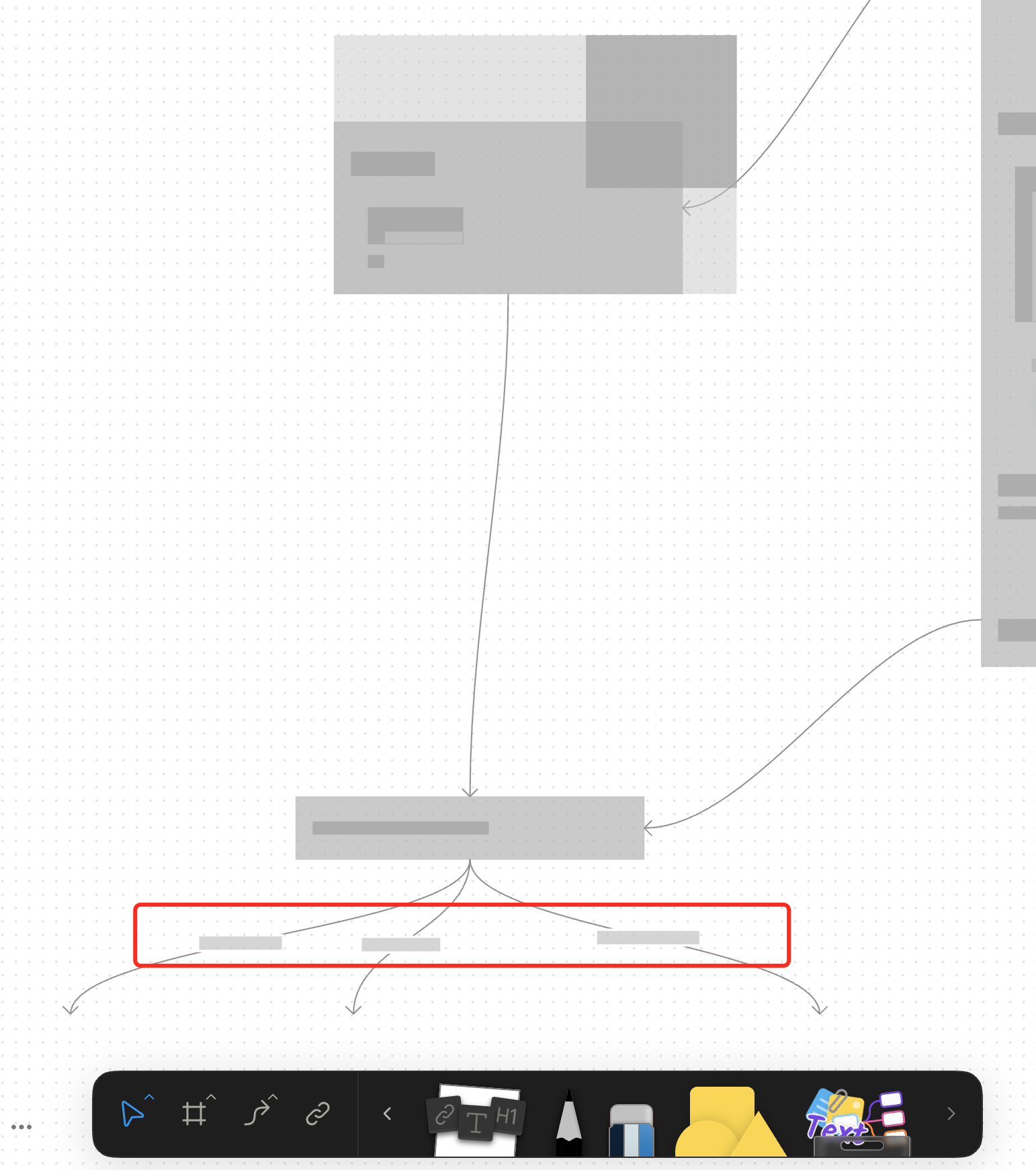
For canvas elements, this PR adds placeholders during zooming operations to improve performance.
### What changed?
- Implemented placeholder rendering during zooming operations in the canvas renderer, but not only DOM.
- Added a `forceFullRender` property to the `GfxCompatibleInterface` to allow elements to opt out of placeholder rendering
- Set `forceFullRender = true` for connectors to ensure they always render properly, even during zooming
- Connected the turbo renderer to the viewport's zooming state to automatically switch between full and placeholder rendering
### Why make this change?
Rendering complex elements during zooming operations can cause performance issues and make the UI feel sluggish. Rendering connector label also leads to high cost DOM `set font` delays.
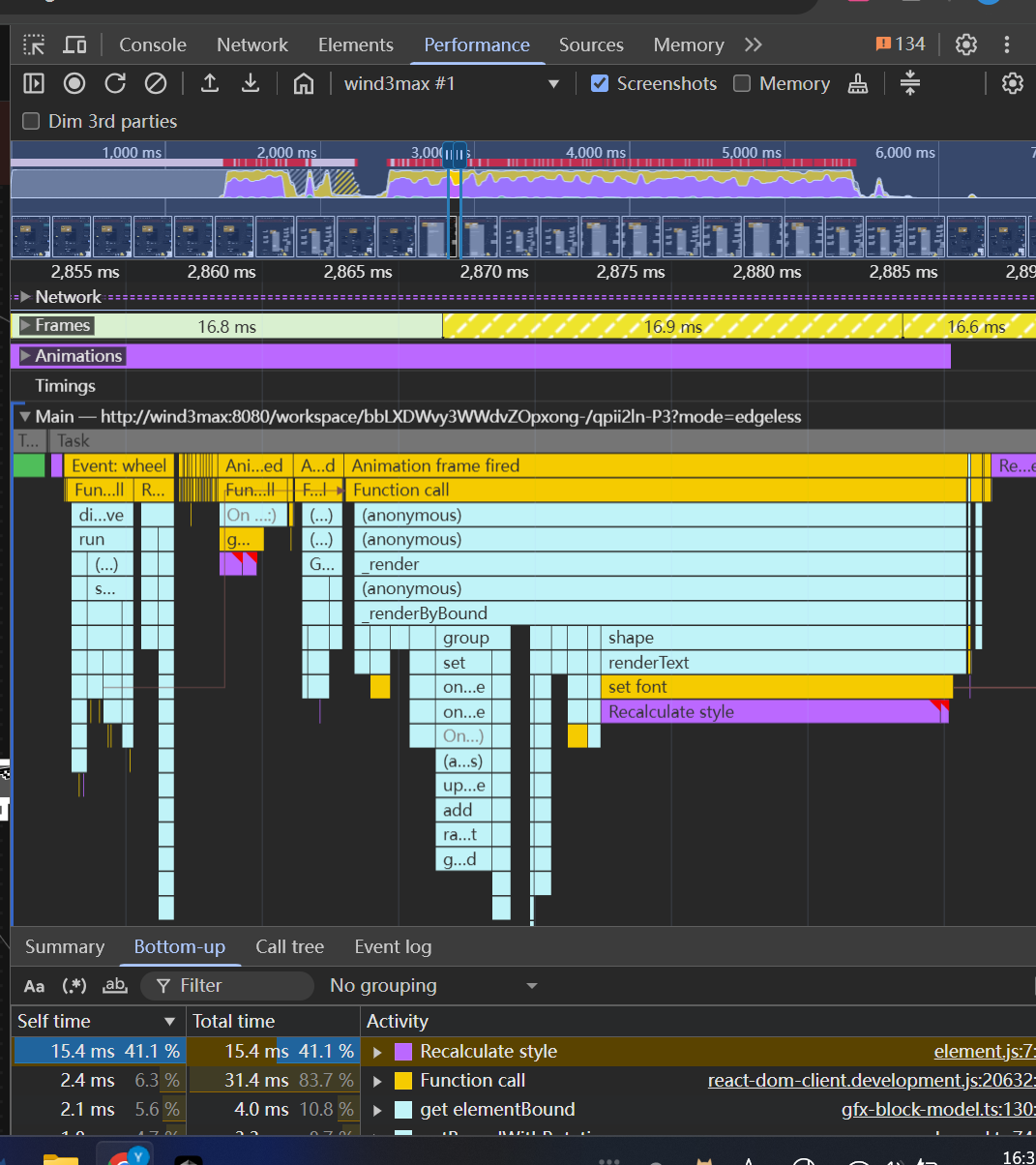
The turbo renderer improves performance by displaying simple placeholders for elements during zooming, while still rendering critical elements like connectors fully. This creates a smoother user experience while maintaining essential visual information.
<!-- This is an auto-generated comment: release notes by coderabbit.ai -->
## Summary by CodeRabbit
- **New Features**
- Introduced a feature-flag-controlled "turbo" rendering mode that displays placeholder graphics during zooming for improved performance.
- Added the ability to override placeholder rendering for specific elements, ensuring full rendering when required.
- **Bug Fixes**
- Enhanced rendering logic to ensure connectors always render fully, even during zoom operations.
- **Documentation**
- Updated API documentation to reflect new properties related to rendering behavior.
- **Tests**
- Improved tests to verify correct rendering behavior for connectors.
<!-- end of auto-generated comment: release notes by coderabbit.ai -->
### Changed
- Rewrite box selection in `default-tool`, the view can decide whether to be selected in box selection by return a boolean value in `onBoxSelected` method
- Cleanup unnecessary states in `default-tool` and some naming problem
### Changed
Moved connector label moving logic from `default-tool` to connector view.
#### Other infrastructure changes:
- Gfx element view now can handles drag events
- Added `context.preventDefault()` support to bypass built-in interactions in extension
- Handle the pointer events in element view will bypass the built-in interactions automatically
> The built-in interactions include element dragging, click selection, drag-to-scale operations, etc.
### Change
- Rename `ElementTransformManager` -> `InteractivityManager`
- Now you can `event.on` and `action.onXXX` method to extend interactivity behaviour. The old approach of overriding methods directly is deprecated.
### TL;DR
Refactor space-triggered AI Widget activation logic from `keydown` to `keypress` event listeners

### Background

The `keydown` event triggered by a space may originate from:
1. Normal space insertion
2. Space triggered by input method confirming candidate words

In scenarios like (2), some browsers (see [ISSUE](https://github.com/toeverything/AFFiNE/issues/11541)) and input method callbacks produce events identical to scenario (1),making it impossible to distinguish between the two.

To fix this, the space-activated AI listener uses the `keypress` event:
In scenario 2, `event.which !== 32` (may be `30430` or other values) can be used to differentiate from scenario 1.

> CLOSE BS-3081
Close [BS-2866](https://linear.app/affine-design/issue/BS-2866/presentation-mode中的note消失)

## Problem
When using RequestAnimationFrame (RAF) for GFX block updates, there was a timing issue where the transform update would lag behind the RAF callback, causing the block to display with the previous frame's transform state.

## Solution
1. Refactored the block state management to use signals for better reactivity
2. Moved block visibility state management from `viewport-element.ts` to `gfx-block-component.ts`
3. Added `transformState$` signal to track block state
4. Synchronized transform updates with RAF using `effect` to ensure updates happen in the correct frame
5. Added test case to verify note visibility in presentation mode
 L-Sun
L-Sun

